AirPassengersTime Series Analysis in R
Time Series in R
- R has dedicated classes for time series objects
tsin BaseRzoofrom zoo package
each obs has 2 parts: point in time and value
ggplot2 packages has dedicated
autoplot()function for time series objects
library(tidyverse)── Attaching core tidyverse packages ──────────────────────── tidyverse 2.0.0 ──
✔ dplyr 1.1.4 ✔ readr 2.1.5
✔ forcats 1.0.0 ✔ stringr 1.5.1
✔ ggplot2 3.5.1 ✔ tibble 3.2.1
✔ lubridate 1.9.3 ✔ tidyr 1.3.1
✔ purrr 1.0.2
── Conflicts ────────────────────────────────────────── tidyverse_conflicts() ──
✖ dplyr::filter() masks stats::filter()
✖ dplyr::lag() masks stats::lag()
ℹ Use the conflicted package (<http://conflicted.r-lib.org/>) to force all conflicts to become errors#autoplot(maunaloa)# Determine the summary statistics of maunaloa
maunaloa %>% summary() Index . Min. :1974 Min. :326.7
1st Qu.:1986 1st Qu.:347.6
Median :1998 Median :366.1
Mean :1998 Mean :369.2
3rd Qu.:2010 3rd Qu.:389.6
Max. :2022 Max. :421.6
data classes representing temporal/time-based data
numeric: integers or floating-point doubles- dates stored as numerics represent integer number of days since 1970-01-01 (start of Unix epoch)
character: strings of text- imported data often represents dates in R as char
- often
"2020-08-23", but don’t always conform to this standard
Daterepresents the day of the year (note the cape)- printing out looks identical to character
"2020-08-23" - allows us to do math with dates:
- printing out looks identical to character
start_date <- as.Date("2020-08-23")
end_date <- as.Date("2020-08-30")

end_date - start_datePOSIXctrepresents date and time (and time zone)ctstands for calendar timePOSIXis a standard for date and time representationPOSIXctis the number of seconds since 1970-01-01POSIXltis a list of date and time componentsPOSIXtis the superclass ofPOSIXctandPOSIXlt- can also perform math with POSIXct objects
lubridate::as_date()converts a character or numeric date to the Date class- similar to Base R’s
as.Date()but with improvements- better performance with time zones
- warnings for invalid formats
- easier conversions from numeric
- similar to Base R’s
my_date <- as_date("2022-01-20")
my_date
[1] "2022-01-20"class(my_date)[1] "Date"Formatting dates
Order of time elements - In US: mm/dd/yyyy - ISO 8601: yyyy-mm-dd
lubridate::parse_date_time()takes an input character or Date vector and returns a POSIXct vector
earthday <- "April 12, 2024"

parse_date_time(earthday,
                orders = "%B %d, $Y") # conversion specifications
[1] "2024-04-12 UTC"- Common conversion specifications:
help(strptime) for more details
| Time Element | Conversion Spec. |
|---|---|
Year (YYYY) |
%Y |
Year (yy) |
%y |
Day (dd) |
%d |
Month (mm) |
%m |
Month (August) |
%B |
Month (Aug) |
%b |
lubridate::ymd()andlubridate::dmy()are shortcuts forparse_date_time()with specific orders
example
# Print the dates_order object
dates_order
[1] “2019-01-01” “2019-01-02” “01/03/2019” “2019-01-04” “2019-01-05” [6] “2019-01-06” “01/07/2019” “2019-01-08” “2019-01-09” “2019-01-10”
# Enter all the date formats from dates_order
parse_date_time(dates_order,
                orders = c("%Y-%m-%d", "%m/%d/%Y"))
[1] “2019-01-01 UTC” “2019-01-02 UTC” “2019-01-03 UTC” “2019-01-04 UTC” [5] “2019-01-05 UTC” “2019-01-06 UTC” “2019-01-07 UTC” “2019-01-08 UTC” [9] “2019-01-09 UTC” “2019-01-10 UTC”
Time Series Attributes
- temporal attributes
- start point
start(AirPassengers) # year 1949 month 1[1] 1949 1- might have a fractional date, e.g. 1998.646, a "decimal date" can convert into POSIXct with
- decimal dates might be useful for ensuring time series have evenly-spaced intervalslubridate::date_decimal(1998.646)[1] "1998-08-24 18:57:35 UTC"- end point
end(AirPassengers) # year 1960 month 12[1] 1960 12- frequency
frequency(AirPassengers) # 12[1] 12- Regular vs. irregular time series
- Regular: evenly-spaced intervals
- No missing values (no missing dates)
- Uses decimal date for ‘irregular’ intervals (e.g. if data is only on weekdays)
- Base R
- Irregular: spacing is irregular
- weekdays, random days
- missing obs
- decimal date/POSIXct date
zoopackage
- Regular: evenly-spaced intervals
examples
# Save the start point of maunaloa: maunaloa_start
maunaloa_start <- start(maunaloa)

# Assign the formatted date to start_iso
start_iso <- date_decimal(maunaloa_start)

# Convert to Date class
as_date(start_iso)
# Assign the start point to card_start
card_start <- start(card_prices)
# Assign the end point to card_end
card_end <- end(card_prices)
# Subtract the start point from the end point
card_end - card_startTime difference of 729 days
Time Series Objects with the zoo package
zooclass of objectsfunctions for manipulating & visualizing time series
vs. baseR’s
ts,zooclass objects can be regular or irregular intervals, converted todata.frames
sample_values <- round(rnorm(10, mean = 100, sd = 15),2)
sample_dates <- as.Date("2020-01-01") + 0:9

library(zoo)
Attaching package: 'zoo'The following objects are masked from 'package:base':
as.Date, as.Date.numeric# create a zoo object
my_zoo <- zoo(x = sample_values, # values
order.by = sample_dates) # index
my_zoo2020-01-01 2020-01-02 2020-01-03 2020-01-04 2020-01-05 2020-01-06 2020-01-07
139.40 95.41 75.13 114.12 89.58 110.95 115.85
2020-01-08 2020-01-09 2020-01-10
88.03 80.98 91.32 older datasets in R are often ts, can convert to zoo
class(AirPassengers)[1] "ts"AP_zoo <- as.zoo(AirPassengers)
class(AP_zoo)[1] "zooreg" "zoo" # methods are different
print(AirPassengers) Jan Feb Mar Apr May Jun Jul Aug Sep Oct Nov Dec
1949 112 118 132 129 121 135 148 148 136 119 104 118
1950 115 126 141 135 125 149 170 170 158 133 114 140
1951 145 150 178 163 172 178 199 199 184 162 146 166
1952 171 180 193 181 183 218 230 242 209 191 172 194
1953 196 196 236 235 229 243 264 272 237 211 180 201
1954 204 188 235 227 234 264 302 293 259 229 203 229
1955 242 233 267 269 270 315 364 347 312 274 237 278
1956 284 277 317 313 318 374 413 405 355 306 271 306
1957 315 301 356 348 355 422 465 467 404 347 305 336
1958 340 318 362 348 363 435 491 505 404 359 310 337
1959 360 342 406 396 420 472 548 559 463 407 362 405
1960 417 391 419 461 472 535 622 606 508 461 390 432print(AP_zoo)Jan 1949 Feb 1949 Mar 1949 Apr 1949 May 1949 Jun 1949 Jul 1949 Aug 1949
112 118 132 129 121 135 148 148
Sep 1949 Oct 1949 Nov 1949 Dec 1949 Jan 1950 Feb 1950 Mar 1950 Apr 1950
136 119 104 118 115 126 141 135
May 1950 Jun 1950 Jul 1950 Aug 1950 Sep 1950 Oct 1950 Nov 1950 Dec 1950
125 149 170 170 158 133 114 140
Jan 1951 Feb 1951 Mar 1951 Apr 1951 May 1951 Jun 1951 Jul 1951 Aug 1951
145 150 178 163 172 178 199 199
Sep 1951 Oct 1951 Nov 1951 Dec 1951 Jan 1952 Feb 1952 Mar 1952 Apr 1952
184 162 146 166 171 180 193 181
May 1952 Jun 1952 Jul 1952 Aug 1952 Sep 1952 Oct 1952 Nov 1952 Dec 1952
183 218 230 242 209 191 172 194
Jan 1953 Feb 1953 Mar 1953 Apr 1953 May 1953 Jun 1953 Jul 1953 Aug 1953
196 196 236 235 229 243 264 272
Sep 1953 Oct 1953 Nov 1953 Dec 1953 Jan 1954 Feb 1954 Mar 1954 Apr 1954
237 211 180 201 204 188 235 227
May 1954 Jun 1954 Jul 1954 Aug 1954 Sep 1954 Oct 1954 Nov 1954 Dec 1954
234 264 302 293 259 229 203 229
Jan 1955 Feb 1955 Mar 1955 Apr 1955 May 1955 Jun 1955 Jul 1955 Aug 1955
242 233 267 269 270 315 364 347
Sep 1955 Oct 1955 Nov 1955 Dec 1955 Jan 1956 Feb 1956 Mar 1956 Apr 1956
312 274 237 278 284 277 317 313
May 1956 Jun 1956 Jul 1956 Aug 1956 Sep 1956 Oct 1956 Nov 1956 Dec 1956
318 374 413 405 355 306 271 306
Jan 1957 Feb 1957 Mar 1957 Apr 1957 May 1957 Jun 1957 Jul 1957 Aug 1957
315 301 356 348 355 422 465 467
Sep 1957 Oct 1957 Nov 1957 Dec 1957 Jan 1958 Feb 1958 Mar 1958 Apr 1958
404 347 305 336 340 318 362 348
May 1958 Jun 1958 Jul 1958 Aug 1958 Sep 1958 Oct 1958 Nov 1958 Dec 1958
363 435 491 505 404 359 310 337
Jan 1959 Feb 1959 Mar 1959 Apr 1959 May 1959 Jun 1959 Jul 1959 Aug 1959
360 342 406 396 420 472 548 559
Sep 1959 Oct 1959 Nov 1959 Dec 1959 Jan 1960 Feb 1960 Mar 1960 Apr 1960
463 407 362 405 417 391 419 461
May 1960 Jun 1960 Jul 1960 Aug 1960 Sep 1960 Oct 1960 Nov 1960 Dec 1960
472 535 622 606 508 461 390 432 using ggplot with zoo
my_zoo %>%
  ggplot()+
  aes(x = Index, # always called Index
      y = my_zoo)+ # by default, the name of the time series
  geom_line()
Don't know how to automatically pick scale for object of type <zoo>. Defaulting
to continuous.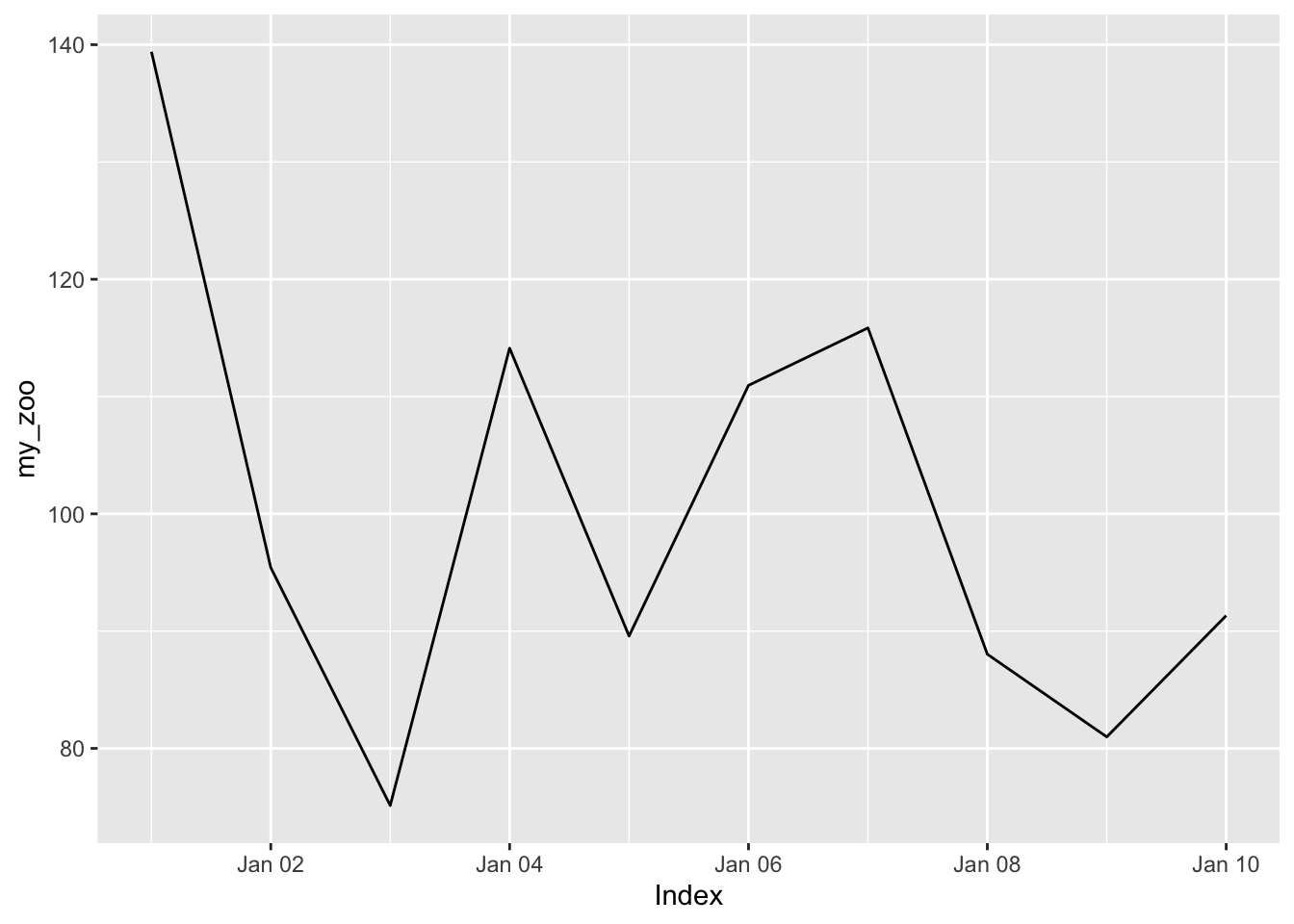
examples
Creating a zoo
zoo objects are an essential tool in the time series analyst tool belt; many advanced functions in time series analysis require time series objects. Creating a zoo object from a vector or data frame is the first step in ensuring your data is ready for a time series analysis!
In this exercise, you’ll create and visualize a time series of the average price of a particular card from a popular trading card game.
You’ll use the core data stored in the vector cards_price, as well as the index vector cards_index, containing the date that each price was sampled.
cards_index, cards_price, and the zoo and ggplot2 packages are available to use.
# Return the head of cards_index
head(cards_index)[1] "2013-01-01" "2013-01-02" "2013-01-03" "2013-01-04" "2013-01-05"
[6] "2013-01-06"# Return the head of cards_price
head(cards_price)[1] 4.88 5.03 5.11 4.77 5.04 5.05# Create a zoo object: cards_zoo
cards_zoo <- zoo(x = cards_price, order.by = cards_index)
# Autoplot cards_zoo
autoplot(cards_zoo)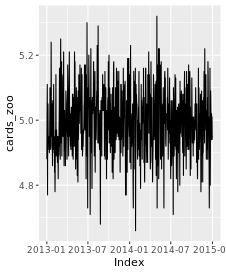
zoo objects, much like data frames, can be visualized with functions from the ggplot2 package. While this course doesn’t go into too much detail regarding ggplot2 plots and functions, it’s nonetheless helpful to review the syntax for more advanced plotting techniques than using autoplot() alone.
In this exercise, you’ll explore using zoo and ggplot2 together. You’ll take the card_prices time series from the previous exercise and generate a ggplot, complete with proper labels, a title, and a theme!
zoo, ggplot2, and card_prices are available to use.
# Enter the x and y axis mapping aesthetics
ggplot(card_prices, aes(x = Index, y = card_prices)) +
  scale_y_continuous() +
  # Plot the data with a red-colored line
  geom_line(color = "red") +

  # Use the light theme
  theme_light() +

  # Enter the appropriate axis labels and title
  labs(
    x = "Index",
    y = "Price (EUR)",
    title = "Daily Card Prices for Trading Card Game"
  )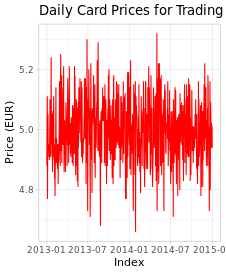
Perfect plotting! ggplot2 has many great options for making an aesthetically pleasing plot, so it’s always a good idea to review some data visualization techniques!
Functions to Manipulate Zoos
zooobjects have two attributes- index (time)
- gives the order of observations; allows series to be sorted and compared (instead of relying on raw order)
- observations might not be in proper order if coming from multiple sources; an index ensures each value of each observation is mapped correctly to its time
- creating a zoo from pairs of unsorted values and times will result in an automatically sorted zoo
- but may not be evenly-spaced, can be large uneven gaps between observations
- “core data” stored in time series
zoo::index()returns the index attribute (vector of dates)zoo::coredata()returns the vector of core data
zoo::index(my_zoo)

# replace index
index(my_zoo) <- new_index

zoo::coredata(my_zoo)

# replace core data
coredata(my_zoo)[1] <- 30
Can have overlapping time series, values that occur in more than one dataset
examples
Updating and replacing indices
The data stored in the index of a time series, as well as the core data, can be retrieved and manipulated as a vector in R. While the index attribute is usually a date or time, it can be a vector of unique values of any class, such as character or numeric.
In this exercise, you’ll manipulate the time series coffee_2000s and coffee_2010s, which represent the average daily prices of coffee during the 2000s and 2010s, respectively.
Using lubridate and zoo, you’ll manipulate and update the index of coffee_2000s, which is formatted in a day-month-Year format.
# Assign the index to index_2000s
index_2000s <- index(coffee_2000s)

index_2000s [1] "01/01/2000" "01/01/2001" "01/01/2002" "01/01/2003" "01/01/2004"
[6] "01/01/2005" "01/01/2006" "01/01/2007" "01/01/2008" "01/01/2009"
[11] "01/02/2000" "01/02/2001" "01/02/2002" "01/02/2003" "01/02/2004" ...# Parse the day-month-Year index_2000s
index_parsed <- parse_date_time(
index_2000s,
orders = '%d/%m/%Y') %>%
as_date()index_parsed
[1] "2000-01-01" "2001-01-01" "2002-01-01" "2003-01-01" "2004-01-01"
[6] "2005-01-01" "2006-01-01" "2007-01-01" "2008-01-01" "2009-01-01"
[11] "2000-02-01" "2001-02-01" "2002-02-01" "2003-02-01" "2004-02-01" ...# Create a zoo based on the new index
coffee_parsed <- zoo(x = coredata(coffee_2000s),
order.by = index_parsed)# Assign the index to index_2000s
index_2000s <- index(coffee_2000s)
# Parse the day-month-Year index_2000s
index_parsed <- parse_date_time(
index_2000s,
orders = "%d/%m/%Y") %>%
as_date()
# Create a zoo based on the new index
coffee_parsed <- zoo(x = coredata(coffee_2000s),
                     order.by = index_parsed)
# Combine the time series and plot the result
coffee_full <- c(coffee_parsed, coffee_2010s)
autoplot(coffee_full)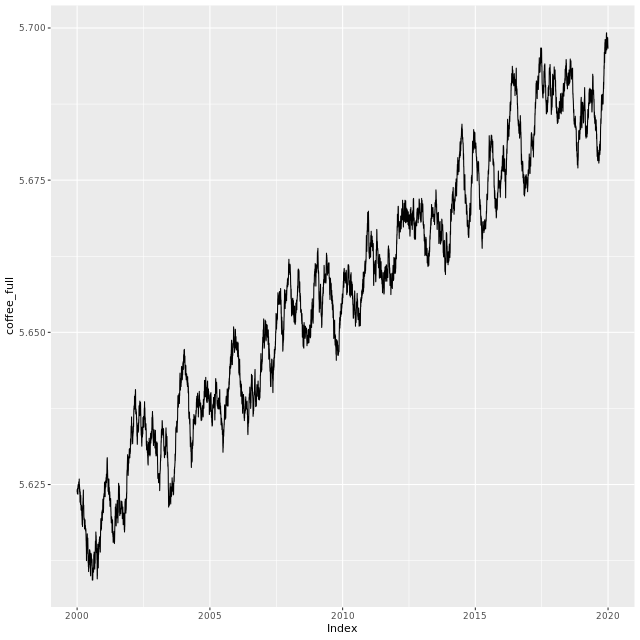
Finding overlapping indices
Time series are said to overlap when there are observations in both time series with the same index, meaning they occur at the same point in time.
By creating a subset using the %in% operator, the overlapping points can be filtered out of one of the time series, allowing the two datasets to be combined.
In this exercise, you’ll take two time series, coffee and coffee_overlap, and remove the elements that overlap.
# Determine the overlapping indexes
overlapping_index <-
  index(coffee_overlap) %in% index(coffee)

# Create a subset of the elements which do not overlap
coffee_subset <- coffee_overlap[!overlapping_index]

# Combine the coffee time series and the new subset
coffee_combined <- c(coffee, coffee_subset)

autoplot(coffee_combined)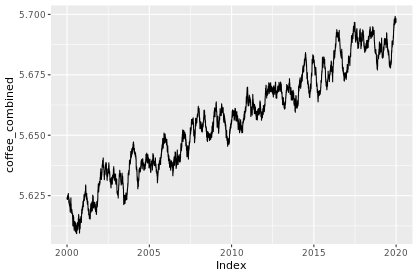
Converting between zoo and dataframe
data.frame
each variable stored as a column
- index stored as column, e.g.
data$dates
- index stored as column, e.g.
can’t plot with
autoplot
zoo
each variable stored as a column of a matrix
index stored as an attribute, e.g.
index(data)can plot with both ggplot
geomand autoplot
Suppose we have a data.frame of prices, to convert to zoo:
prices_zoo <- zoo(x = prices$value,
                  order.by = prices$date)
to convert a zoo to a dataframe:
data_df <- data.frame(index(my_zoo),
                      coredata(my_zoo))
but an even better way, using fortify.zoo():
data_df <- fortify.zoo(my_zoo)example
When working with real-world time series data, you’ll often import data from spreadsheets and tabular data – data formatted like a data frame. By converting your data to a zoo object, you can be better prepared to perform time series analysis!
Likewise, converting a time series into a data frame allows you to manipulate and export your data in a format that’s widely readable in other software and programming languages outside of R.
The card_prices time series – a time series for the mean daily prices of three trading cards – as well as the lubridate, zoo, and ggplot2 packages have been loaded for you.
card_prices
           price_1 price_2 price_3
2013-01-01    4.88    0.81    2.05
2013-01-02    5.03    0.80    2.11
2013-01-03    5.11    0.82    2.31
2013-01-04    4.77    0.73    2.04
2013-01-05    5.04    0.73    2.03
2013-01-06    5.05    0.73    2.12
2013-01-07    4.94    0.82    2.07
...
# Fortify to data frame: cards_df
cards_df <- fortify.zoo(card_prices)
# Add together the three price columns from cards_df
cards_df$total_price <-
cards_df$price_1 +
cards_df$price_2 +
cards_df$price_3
# Create the total_price_zoo time series
total_price_zoo <- zoo(x = cards_df$total_price,
order.by = cards_df$Index)
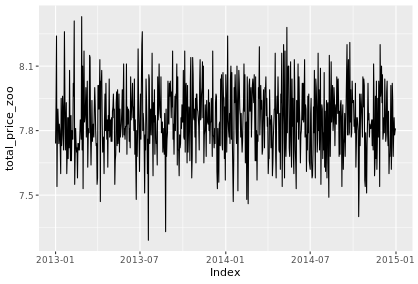
# Generate an autoplot of the new time series
autoplot(total_price_zoo)