from sklearn.module import Model

# create a variable named model and instantiate the Model
model = Model()

# fit model to data
model.fit(X, y)         # X is array of features, y is array of target variable values

predictions = model.predict(X_new)Machine Learning in Python
Supervised learning with scikit-learn
Terminology
- “feature” = predictor variable = independent variable
- “target” variable = dependent variable = response variable
Requirements for supervised learning:
- no missing values
- data in numeric format
- data stored in Pandas DataFrame or NumPy array
scikit-learn syntax
- import a Model (algorithm for our problem, e.g. KNN) from a module
Classification
- Build a model
- Model learns from labeled data we pass to it
- Pass unlabeled data as input
- Model predicts the labels of the unseen data
Labelled data = training data
K Nearest Neighbors
- Predict the label of a data point by looking at the
- KNN creates a decision boundary
from sklearn.neighbors import KNeighborsClassifier

# split out data into X a 2D array of features and y a 1D array of target values
## use .values method to turn to NumPy arrays
X = churn_df[["total_day_charge", "total_eve_charge"]].values
y = churn_df["churn"].values

# instantiate classifier
knn = KNeighborsClassifier(n_neighbors = 15)
knn.fit(X, y)

# three test data observations with three obs and two features
X_new = np.array([[56.8, 17.5],
                    [24.4, 24.1],
                    [50.1, 10.9]])

predictions = knn.predict(X_new)
print('Predictions: {}'.format(predictions)) # gives
example
# Import KNeighborsClassifier
from sklearn.neighbors import KNeighborsClassifier

y = churn_df["churn"].values
X = churn_df[["account_length", "customer_service_calls"]].values

# Create a KNN classifier with 6 neighbors
knn = KNeighborsClassifier(n_neighbors=6)

# Fit the classifier to the data
knn.fit(X, y)
X_new = np.array([[30.0, 17.5],
[107.0, 24.1],
[213.0, 10.9]])# Predict the labels for the X_new
y_pred = knn.predict(X_new)
# Print the predictions
print("Predictions: {}".format(y_pred)) Predictions: [0 1 0]Great work! The model has predicted the first and third customers will not churn in the new array. But how do we know how accurate these predictions are? Let’s explore how to measure a model’s performance in the next video.
Measuring Model Performance
For classifciation, accuracy commonly used:
First split the data into training & test data set, train on the training data, test it on the test data set
from sklearn.model_selection import train_test_split
X_train, X_test, y_train, y_test = train_test_split(X, y,
                                                    test_size = 0.3,
                                                    random_state = 21,
                                                    stratify = y)

knn = KNeighborsClassifier(n_neighbors = 6)

knn.fit(X_train, y_train)
print(knn.score(X_test, y_test)) # prints accuracy- Commonly use 20-30% of data for testing
random_stateis a random seed for splitting reproduciblystratifyon the target variable ensures that about z% of data in test are 1/TRUE to match the z% of 1/TRUE in training & testing datas
train_test_split() returns 4 arrays - X_train training data - X_test test data - y_train training labels - y_test test labels
Model complexity
how to interpret
decision boundaries are thresholds to determine what label a model gives an observation
as
as
can consider
# create empty dictionaries to store train & test accuracies
train_accuracies = {}
test_accuracies = {}
neighbors = np.arange(1, 26) # range of k values

# for loop to iterate model over values of k
for neighbor in neighbors:
    knn = KNeighborsClassifier(n_neighbors = neighbor)
    knn.fit(X_train, y_train)
    train_accuracies[neighbor] = knn.score(X_train, y_train)
    test_accuracies[neighbor] = knn.score(X_test, y_test)

# plot the data
plt.figure(figsize = (8,6))
plt.title("KNN: Varying Number of Neighbors")
plt.plot(neighbors, train_accuracies.values(), label = "Training Accuracy")
plt.plot(neighbors, test_accuracies.values(), label = "Test Accuracy")
plt.legend()
plt.xlabel("Number of neighbors")
plt.ylabel("Accuracy")
plt.show()
Example
# Import the module
from sklearn.model_selection import train_test_split

X = churn_df.drop("churn", axis=1).values
y = churn_df["churn"].values

# Split into training and test sets
X_train, X_test, y_train, y_test = train_test_split(X, y, test_size=0.20, random_state=42, stratify=y)
knn = KNeighborsClassifier(n_neighbors=5)

# Fit the classifier to the training data
knn.fit(X_train, y_train)

# Print the accuracy
print(knn.score(X_test, y_test))0.8740629685157422Excellent! In a few lines of code you split a dataset, fit a KNN model, and found its accuracy to be 87%!
# Create neighbors
neighbors = np.arange(1, 13) # 1 to 12
train_accuracies = {}
test_accuracies = {}

for neighbor in neighbors:

    # Set up a KNN Classifier
    knn = KNeighborsClassifier(n_neighbors = neighbor)

    # Fit the model
    knn.fit(X_train, y_train)

    # Compute accuracy
    train_accuracies[neighbor] = knn.score(X_train, y_train)
    test_accuracies[neighbor] = knn.score(X_test, y_test)
print(neighbors, '\n', train_accuracies, '\n', test_accuracies)
[ 1 2 3 4 5 6 7 8 9 10 11 12]
{1: 1.0, 2: 0.887943971985993, 3: 0.9069534767383692, 4: 0.8734367183591796, 5: 0.8829414707353677, 6: 0.8689344672336168, 7: 0.8754377188594297, 8: 0.8659329664832416, 9: 0.8679339669834918, 10: 0.8629314657328664, 11: 0.864432216108054, 12: 0.8604302151075538}
{1: 0.7871064467766117, 2: 0.8500749625187406, 3: 0.8425787106446777, 4: 0.856071964017991, 5: 0.8553223388305847, 6: 0.861319340329835, 7: 0.863568215892054, 8: 0.8605697151424287, 9: 0.8620689655172413, 10: 0.8598200899550225, 11: 0.8598200899550225, 12: 0.8590704647676162}Notice how training accuracy decreases as the number of neighbors initially gets larger, and vice versa for the testing accuracy? These scores would be much easier to interpret in a line plot, so let’s produce a model complexity curve of these results.
# Add a title
plt.title("KNN: Varying Number of Neighbors")

# Plot training accuracies
plt.plot(neighbors, train_accuracies.values(), label="Training Accuracy")

# Plot test accuracies
plt.plot(neighbors, test_accuracies.values(), label="Test Accuracy")

plt.legend()
plt.xlabel("Number of Neighbors")
plt.ylabel("Accuracy")

# Display the plot
plt.show()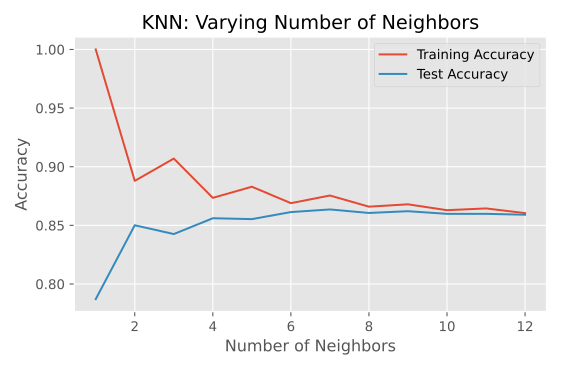
Great work! See how training accuracy decreases and test accuracy increases as the number of neighbors gets larger. For the test set, accuracy peaks with 7 neighbors, suggesting it is the optimal value for our model. Now let’s explore regression models!
Regression
Example to predict glucose levels
import pandas as pd
diabetes_df = pd.read_csv("diabetes.csv")
#print(diabetes_df.head())

X = diabetes_df.drop("glucose", axis = 1).values # use all but glucose
y = diabetes_df['glucose'].values
#print(type(X), type(y)) # see they are NumPy arrays
Predict glucose from a single feature BMI
X_bmi = X[:, 3]                 # 4th column is BMI
print(y.shape, X_bmi.shape)     # (752, ) (752, )
scikit-learn requires features to be a 2-dimensional array
X_bmi = X_bmi.reshape(-1,1)
print(X_bmi.shape)          # (752, 1) the correct shape
make scatterplot
import matplotlib.pyplot as plt
plt.scatter(X_bmi, y)
plt.ylabel("Blood Glucose (mg/dl)")
plt.xlabel("Body Mass Index")
plt.show()
fit regression model
from sklearn.linear_model import LinearRegression
reg = LinearRegression()
reg.fit(X_bmi, y) # features X first
predictions = reg.predict(X_bmi)

# scatterplot
plt.scatter(X_bmi, y)
plt.plot(X_bmi, predictions)
plt.ylabel("Blood Glucose (mg/dl)")
plt.xlabel("Body Mass Index")
plt.show()
example
sales_df:

           tv     radio  social_media      sales
0     16000.0   6566.23       2907.98   54732.76
1     13000.0   9237.76       2409.57   46677.90
2     41000.0  15886.45       2913.41  150177.83
3     83000.0  30020.03       6922.30  298246.34
4     15000.0   8437.41       1406.00   56594.18
...       ...       ...           ...        ...
4541  26000.0   4472.36        717.09   94685.87
4542  71000.0  20610.69       6545.57  249101.92
4543  44000.0  19800.07       5096.19  163631.46
4544  71000.0  17534.64       1940.87  253610.41
4545  42000.0  15966.69       5046.55  148202.41

[4546 rows x 4 columns]
import numpy as np
# Create X from the radio column's values
X = sales_df['radio'].values
# Create y from the sales column's values
y = sales_df['sales'].values
# Reshape X
X = X.reshape(-1,1)
# Check the shape of the features and targets
print(X.shape, y.shape)(4546, 1) (4546,)Excellent! See that there are 4546 values in both arrays? Now let’s build a linear regression model!
# Import LinearRegression
from sklearn.linear_model import LinearRegression

# Create the model
reg = LinearRegression()

# Fit the model to the data
reg.fit(X, y)

# Make predictions
predictions = reg.predict(X)

print(predictions[:5])
[ 95491.17119147 117829.51038393 173423.38071499 291603.11444202
111137.28167129]Great model building! See how sales values for the first five predictions range from $95,000 to over $290,000. Let’s visualize the model’s fit.
# Import matplotlib.pyplot
import matplotlib.pyplot as plt

# Create scatter plot
plt.scatter(X, y, color="blue")

# Create line plot
plt.plot(X, predictions, color="red")
plt.xlabel("Radio Expenditure ($)")
plt.ylabel("Sales ($)")

# Display the plot
plt.show()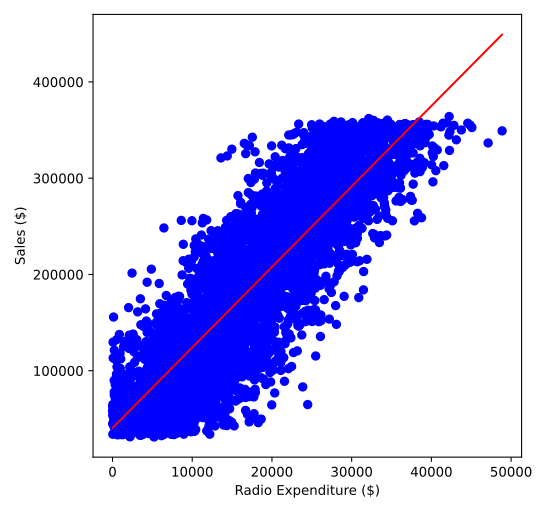
to calculate RMSE (root mean square error ) - average sum of squared errors then sqrt
from sklearn.metrics import mean_squared_error
mean_squared_error(y_test, y_pred, squared = False) # returns RMSE
example
# Create X and y arrays
X = sales_df.drop("sales", axis=1).values
y = sales_df["sales"].values

X_train, X_test, y_train, y_test = train_test_split(X, y, test_size=0.3, random_state=42)

# Instantiate the model
reg = LinearRegression()

# Fit the model to the data
reg.fit(X_train,y_train)

# Make predictions
y_pred = reg.predict(X_test)
print("Predictions: {}, Actual Values: {}".format(y_pred[:2], y_test[:2]))
Predictions: [53176.66154234 70996.19873235], Actual Values: [55261.28 67574.9 ]Great work! The first two predictions appear to be within around 5% of the actual values from the test set!
# Import mean_squared_error
from sklearn.metrics import mean_squared_error

# Compute R-squared
r_squared = reg.score(X_test, y_test)

# Compute RMSE
rmse = mean_squared_error(y_test, y_pred, squared=False)

# Print the metrics
print("R^2: {}".format(r_squared))
print("RMSE: {}".format(rmse))
R^2: 0.9990165886162027
RMSE: 2942.372219812037Cross-Validation
Returned
- cross-validation as a solution: split dataset into (e.g. 5) groups or folds
- set aside first fold as test set; fit model on remaining 4 folds, predict on test set, compute metric of interest (e.g.
- then do this with second fold (as test set); fit on other 4 folds…etc.
- so we get five
- called “5-fold CV”
- set aside first fold as test set; fit model on remaining 4 folds, predict on test set, compute metric of interest (e.g.
Tradeoff: using more folds is more computationally expensive (fitting & predicting more times)
from sklearn.model_selection import cross_val_score, KFold
kf = KFold(n_splits = 6,                        # number of folds, default is 5
            shuffle = True,                     # shuffles dataset before splitting into folds
            random_state = 42)                  # random seed for reproducibility

reg = LinearRegression()
cv_results = cross_val_score(reg,       # model
                            X,          # features
                            y,          # target
                            cv = kf)    # kf variable

# Reports array of length 6 of R^2's (default score for linear regression)
print(cv_results)
print(np.mean(cv_results), np.std(cv_results))              # mean & sd of R^2s
print(np.quantile(cv_results, [0.025, 0.975]))              # 95% confidence interval
example
# Import the necessary modules
from sklearn.model_selection import cross_val_score, KFold

# Create a KFold object
kf = KFold(n_splits=6, shuffle=True, random_state=5)

reg = LinearRegression()

# Compute 6-fold cross-validation scores
cv_results = cross_val_score(reg, X, y, cv=kf)

# Print scores
print(cv_results)[0.74451678 0.77241887 0.76842114 0.7410406 0.75170022 0.74406484]Notice how R-squared for each fold ranged between 0.74 and 0.77? By using cross-validation, we can see how performance varies depending on how the data is split!
# Print the mean
print(np.mean(cv_results))

# Print the standard deviation
print(np.std(cv_results))

# Print the 95% confidence interval
print(np.quantile(cv_results, [0.025, 0.975]))
0.7536937416666666
0.012305386274436092
[0.74141863 0.77191915]An average score of 0.75 with a low standard deviation is pretty good for a model out of the box! Now let’s learn how to apply regularization to our regression models.
Regularized regression (Ridge regression & Lasso regression)
Technique used to avoid overfitting
Linear regression model minimizes a loss function (SSR); chooses a
- large coefficients can lead to overfitting
“Regularization:” Common practice to alter loss function so that it penalizes large coefficients
One type of regularization is Ridge regression: OLS loss function (min SSR) plus the squared value of each coefficient
when minimizing the loss function, models are penalized for coefficients with large (positive or negative) values
- Need to choose
- Can select
- known as a “hyperparameter”, variable used for selecting a model’s parameters
- controls model complexity
- when
- very high
- Can select
from sklearn.linear_model import Ridge

# create an empty list for scores to show impact of alpha values
scores = []
for alpha in [0.1, 1.0, 10.0, 100.0, 1000.0]:
    ridge = Ridge(alpha = alpha) # alpha argument equal to iterator alpha
    ridge.fit(X_train, y_train)
    y_pred = ridge.predict(X_test)
    scores.append(ridge.score(X_test, y_test)) # save R^2 values

print(scores) # see R^2 gets worse as alpha increases- Another type of regularization, Lasso: OLS loss function (min SSR) plus the absolute value value of each coefficient
from sklearn.linear_model import Lasso

# create an empty list for scores to show impact of alpha values
scores = []
for alpha in [0.1, 1.0, 10.0, 20.0, 50.0]:
    lasso = Lasso(alpha = alpha) # alpha argument equal to iterator alpha
    lasso.fit(X_train, y_train)
    y_pred = lasso.predict(X_test)
    scores.append(lasso.score(X_test, y_test)) # save R^2 values

print(scores) # see R^2 gets worse as alpha increases
Lasso regression can be used to assess feature importance - tends to shrink coefficients of less important features to zero - features whose coeffs aren’t shrunk to zero are selected by lasso algorithm
# assessing feature importance using Lasso
from sklearn.linear_model import Lasso

# use whole dataset, rather than splitting it
X = df.drop('y_var', axis = 1).values
y = df('y_var').values
names = df.drop('y_var', axis = 1).columns

lasso = Lasso(alpha = 0.1)
lasso_coef = lasso.fit(X, y).coef_

# plot coefficients for each feature
plt.bar(names, lasso_coef)
plt.xticks(rotation = 45)
plt.show()
example
# Import Ridge
from sklearn.linear_model import Ridge
alphas = [0.1, 1.0, 10.0, 100.0, 1000.0, 10000.0]
ridge_scores = []
for alpha in alphas:

  # Create a Ridge regression model
  ridge = Ridge(alpha = alpha)

  # Fit the data
  ridge.fit(X_train, y_train)

  # Obtain R-squared
  score = ridge.score(X_test, y_test)
  ridge_scores.append(score)
print(ridge_scores)[0.9990152104759369, 0.9990152104759373, 0.9990152104759419, 0.9990152104759871, 0.9990152104764387, 0.9990152104809561]Well done! The scores don’t appear to change much as alpha increases, which is indicative of how well the features explain the variance in the target—even by heavily penalizing large coefficients, underfitting does not occur!
# Import Lasso
from sklearn.linear_model import Lasso

# Instantiate a lasso regression model
lasso = Lasso(alpha = 0.3)

# Fit the model to the data
lasso.fit(X, y)

# Compute and print the coefficients
lasso_coef = lasso.fit(X, y).coef_
print(lasso_coef)
plt.bar(sales_columns, lasso_coef)
plt.xticks(rotation=45)
plt.show()
[ 3.56256962 -0.00397035 0.00496385]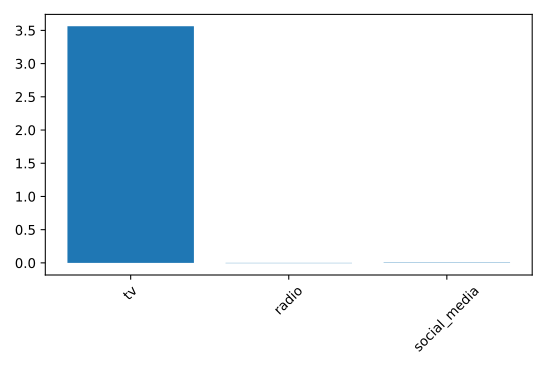
See how the figure makes it clear that expenditure on TV advertising is the most important feature in the dataset to predict sales values! In the next chapter, we will learn how to further assess and improve our model’s performance!
Fine Tuning
- Consider classification and accuracy measure of classification
- cases where it’s not a useful metric
- e.g. consider bank fraud, where 99% of transactions are not fraud
- suppose a classifier predicts 100% of transactions are not fraud - has 99% accuracy! but terrible at predicting actual fraud - its original purpose!
- “class imbalance” - uneven frequency of classes; needs different way to assess performance
- Confusion matrix for classification
| Predicted False | Predicted True | |
|---|---|---|
| Actual False | Correct | False Positive |
| Actual True | False Negative | Correct |
- Accuracy: proportion of correct predictions,
acc = (TN + TP) / (TN + TP + FN + FP)
- Precision (positive predictive value): true positives / true & false positives
(correctly labeled fraudulent transactions) divided by all transactions labeled fraudulent (true and false) - High precision -> lower false positive rate (fewer legitimate transactions labeled fraudulent mistakenly)
- Sensitivity or Recall: true positives / true positives + false negatives
- Higher sensitivity -> lower false negative rate (predicting most fraudulent transactions correctly)
- F1 score
F-1 score is the harmonic mean of precision & recall - gives equal weight to precision & recall, so it factors in both the number of errors made by model & the type of errors - favors models with similar precision & recall, useful metric to find a model that performs reasonably well across both metrics
compute confusion matrix
from sklearn.metrics import classification_report, confusion_matrix

# run classification model (KNN) ...

print(confusion_matrix(y_test, y_pred))[[TN FP]
[ FN TP]]print(classification_report(y_test, y_pred))Correct! With limited capacity, the sales team needs the model to return the highest proportion of true positives compared to all predicted positives, thus minimizing wasted effort.
example
# Import confusion matrix
from sklearn.metrics import classification_report, confusion_matrix

knn = KNeighborsClassifier(n_neighbors=6)

# Fit the model to the training data
knn.fit(X_train, y_train)

# Predict the labels of the test data: y_pred
y_pred = knn.predict(X_test)

# Generate the confusion matrix and classification report
print(confusion_matrix(y_test, y_pred))
print(classification_report(y_test, y_pred))[[116 35]
[ 46 34]]
precision recall f1-score support
0 0.72 0.77 0.74 151
1 0.49 0.42 0.46 80
accuracy 0.65 231
macro avg 0.60 0.60 0.60 231
weighted avg 0.64 0.65 0.64 231| Predicted False | Predicted True | |
|---|---|---|
| Actual False | 116 | 35 |
| Actual True | 46 | 34 |
Excellent! The model produced 34 true positives and 35 false positives, meaning precision was less than 50%, which is confirmed in the classification report. The output also shows a better F1-score for the zero class, which represents individuals who do not have diabetes.
Logistic Regression
- produces a linear decision boundary
from sklearn.linear_model import LogisticRegression
logreg = LogisticRegression()
X_train, X_test, y_train, y_test = train_test_split(X, y, test_size = 0.3, random_state = 42)

logreg.fit(X_train, y_train)

y_pred = logreg.predict(X_test)
Can predict probabilities of each instance belonging to a class with .predict_proba() method, passing the test features to it
# returns 2D arrawy with probs for both classes

y_pred_probs = logreg.predict_proba(X_test)[:, 1]       # slice second column (positive class probabilities)
Default threshold is 0.5, but can vary the threshold
Reciever Operating Characteristic (ROC) curve to visualize how different thresholds affect ture positive and false positive rates. - 45 degree line = random chance guessing labels - At threshold = 0, model predicts 1 for all observations (correctly predicts all positive cases but incorrectly predict all negative cases); true & false positive rates = 1 - At threshold = 1, model predicts 0 for all observations (correctly predicts all negative cases but incorrectly predict all positive cases); true & false positive rates = 0 - Varying threshold gets a series of different FP and TP rates
from sklearn.metrics import roc_curve
fpr, tpr, thresholds = roc_curve(y_test, y_pred_probs)
# unpacks into three variables - false positive rate, true positive rate & thresholds

# plot
plt.plot([0, 1], [0, 1], 'k--')         # plot dotted line from 0 to 1
plt.plot(fpr, tpr)
plt.xlabel('False Positive Rate')
plt.ylabel('True Positive Rate')
plt.title('Logistic Regression ROC Curve')
plt.show()
ROC AUC
- If we had a model with 1 for tpr and 0 for fpr, this would be a perfect model
- We calculate the area under the ROC curve (AUC) ranging from 0 - 1 (ideal)
from sklearn.metrics import roc_auc_score
print(roc_auc_score(y_test, y_pred_probs))
example
# Import LogisticRegression
from sklearn.linear_model import LogisticRegression

# Instantiate the model
logreg = LogisticRegression()

# Fit the model
logreg.fit(X_train, y_train)

# Predict probabilities
y_pred_probs = logreg.predict_proba(X_test)[:, 1]

print(y_pred_probs[:10])
[0.26551031 0.18336542 0.12119596 0.15613565 0.49611285 0.44582236
0.01359235 0.61646125 0.55640546 0.7931187 ]Nicely done! Notice how the probability of a diabetes diagnosis for the first 10 individuals in the test set ranges from 0.01 to 0.79. Now let’s plot the ROC curve to visualize performance using different thresholds.
# Import roc_curve
from sklearn.metrics import roc_curve

# Generate ROC curve values: fpr, tpr, thresholds
fpr, tpr, thresholds = roc_curve(y_test, y_pred_probs)

plt.plot([0, 1], [0, 1], 'k--')

# Plot tpr against fpr
plt.plot(fpr, tpr)
plt.xlabel('False Positive Rate')
plt.ylabel('True Positive Rate')
plt.title('ROC Curve for Diabetes Prediction')
plt.show()
Well done! The ROC curve is above the dotted line, so the model performs better than randomly guessing the class of each observation.
# Import roc_auc_score
from sklearn.metrics import roc_auc_score

# Calculate roc_auc_score
print(roc_auc_score(y_test, y_pred_probs))

# Calculate the confusion matrix
print(confusion_matrix(y_test, y_pred))

# Calculate the classification report
print(classification_report(y_test, y_pred))
0.8002483443708608
[[121 30]
[ 30 50]]
precision recall f1-score support
0 0.80 0.80 0.80 151
1 0.62 0.62 0.62 80
accuracy 0.74 231
macro avg 0.71 0.71 0.71 231
weighted avg 0.74 0.74 0.74 231Did you notice that logistic regression performs better than the KNN model across all the metrics you calculated? A ROC AUC score of 0.8002 means this model is 60% better than a chance model at correctly predicting labels! scikit-learn makes it easy to produce several classification metrics with only a few lines of code.
Hyperparameter Tuning
How to optimize model
Recall we had to choose an
Hyperparameters are parameters we specify before fitting the model (like
Hyperparameter tuning: 1. Try lots of different hyperparameter values 2. Fit all of them separately 3. See how well they perform 4. Choose the best performing values
Use cross-validation to avoid overfitting hyperparameters to the test set Can still split the data, but perform CV on the training set Withhold the test set and use it for evaluating the tuned model
One approach is called grid search - choose a grid of possible valyues to try
from sklearn.model_selection import GridSearchCV

# instantiate KFold
kf = KFold(n_splits = 5, shuffle = True, random_state = 42)

# specify names and values of hyperparameters as keys & values of a dict
param_grid = {"alpha": np.arrange(0.0001, 1, 10),
              "solver": ["sag", "lsqr"]}

# instantiate model
ridge = Ridge()

# call gridsearchCV
ridge_cv = GridSearchCV(ridge, param_grid, cv = kf)

# returns a gridsearch object which we can then fit to the training data
ridge_cv.fit(X_train, y_train) # performs the CV grid search

# print the model's attriburtes best_params_ and best_score_ attributes
print(ridge_cv.best_params_, ridge_cv.best_score_)

# will retrieve hyperparameters that perform the best, along with the mean CV score over that fold
With grid search, the number of fits = number of hyperparameters * number of values * number of folds, doesn’t scale well - 3-fold CV, 1 hyperparameter, 10 total values = 30 fits - 10-fold CV, 3 hyperparameters, 30 total values = 900 fits
Another way: perform a random search, which picks random hyperparameter values
from sklearn.model_selection import RandomizedSearchCV
kf = KFold(n_splits = 5, shuffle = True, random_state = 42)
param_grid = {"alpha": np.arrange(0.0001, 1, 10),
              "solver": ["sag", "lsqr"]}
ridge = Ridge()
ridge_cv = RandomizedSearchCV(ridge, param_grid, cv = kf, n_iter = 2)      # n_iter determins number of hyperparam values tested
ridge_cv.fit(X_train, y_train)
print(ridge_cv.best_params_, ridge_cv.best_score_)
Evaluate on test set
test_score = ridge_cv.score(X_test, y_test)
print(test_score)
example
# Import GridSearchCV
from sklearn.model_selection import GridSearchCV

# Set up the parameter grid
param_grid = {"alpha": np.linspace(0.00001, 1, 20)}

# Instantiate lasso_cv
lasso_cv = GridSearchCV(lasso, param_grid, cv=kf)

# Fit to the training data
lasso_cv.fit(X_train, y_train)
print("Tuned lasso paramaters: {}".format(lasso_cv.best_params_))
print("Tuned lasso score: {}".format(lasso_cv.best_score_))
Tuned lasso paramaters: {'alpha': 1e-05}
Tuned lasso score: 0.33078807238121977Well done! Unfortunately, the best model only has an R-squared score of 0.33, highlighting that using the optimal hyperparameters does not guarantee a high performing model!
# Create the parameter space
params = {"penalty": ["l1", "l2"],
         "tol": np.linspace(0.0001, 1.0, 50),
         "C": np.linspace(0.1, 1.0, 50),
         "class_weight": ["balanced", {0:0.8, 1:0.2}]}

# Instantiate the RandomizedSearchCV object
logreg_cv = RandomizedSearchCV(logreg, params, cv=kf)

# Fit the data to the model
logreg_cv.fit(X_train, y_train)

# Print the tuned parameters and score
print("Tuned Logistic Regression Parameters: {}".format(logreg_cv.best_params_))
print("Tuned Logistic Regression Best Accuracy Score: {}".format(logreg_cv.best_score_))
Tuned Logistic Regression Parameters: {'tol': 0.8571571428571428, 'penalty': 'l2', 'class_weight': 'balanced', 'C': 0.19183673469387758}
Tuned Logistic Regression Best Accuracy Score: 0.7541383446621351Great searching! Even without exhaustively trying every combination of hyperparameters, the model has an accuracy of over 70% on the test set! So far we have worked with clean datasets; however, in the next chapter, we will discuss the steps required to transform messy data before building supervised learning models.
Preprocessing Data
scikit-learn requires no missing data and all numeric data - need to preprocess data to make it useable for a model
categorical features -> make numeric with dummy variables - include OneHotEncoder() or pandas get_dummies()
import pandas as pd
music_df = pd.read_csv("music.csv")
music_dummies = pd.get_dummies(music_df['genre'], drop_first = True)        # only need 9/10 categories as dummies (n-1)
#print(music_dummies.head())

# combine with original dataframe
music_dummies = pd.concat([music_df, music_dummies], axis = 1)
music_dummies = music_dummies.drop('genre', axis = 1)                       # get rid of categorical genre column (now dummies)
example
# Create music_dummies
music_dummies = pd.get_dummies(music_df, drop_first = True)

# Print the new DataFrame's shape
print("Shape of music_dummies: {}".format(music_dummies.shape))
Shape of music_dummies: (1000, 20)As there were ten values in the “genre” column, nine new columns were added by a call of pd.get_dummies() using drop_first=True. After dropping the original “genre” column, there are still eight new columns in the DataFrame!
music_dummies has been preloaded for you, along with Ridge, cross_val_score, numpy as np, and a KFold object stored as kf:
# Create X and y
X = music_dummies.drop('popularity', axis = 1).values
y = music_dummies['popularity'].values

# Instantiate a ridge model
ridge = Ridge(alpha = 0.2)

# Perform cross-validation
scores = cross_val_score(ridge, X, y, cv= kf, scoring="neg_mean_squared_error")

# Calculate RMSE
rmse = np.sqrt(-scores)
print("Average RMSE: {}".format(np.mean(rmse)))
print("Standard Deviation of the target array: {}".format(np.std(y)))
Average RMSE: 8.236853840202299
Standard Deviation of the target array: 14.02156909907019Great work! An average RMSE of approximately 8.24 is lower than the standard deviation of the target variable (song popularity), suggesting the model is reasonably accurate.
Missing Data
print(df.isna().sum().sort_values()) to show each dummy’s # of missing values
- drop NAs if they are less than 5% of data (suppose only a and c have <5% NAs):
df = df.drop_na(subset = ['cat_a', 'cat_c'])
- alternatively, impute NAs with educated guesses, e.g. use the mean, median, or (for categorical - mode)
- must split our data first, to avoid data leakage of test set into model
from sklearn.impute import SimpleImputer

# separate imputations for categorical and numeric data
X_cat = music_df['genre'].values.reshape(-1,1)
X_num = music_df.drop(['genre', 'popularity'], axis = 1).values
y = music_df['popularity'].values

X_train_cat, X_test_cat, y_train, y_test = train_test_split(X_cat, y, test_size = 0.2, random_state = 12)

X_train_num, X_test_num, y_train, y_test = train_test_split(X_num, y, test_size = 0.2, random_state = 12)

# impute missing categorical data
imp_cat = SimpleImputer(strategy = "most_frequent")
X_train_cat = imp_cat.fit_transform(X_train_cat)
X_test_cat = imp_cat.transform(X_test_cat)

# impute missing numeric data
imp_num = SimpleImputer()       # by default, uses mean
X_train_num = imp_num.fit_transform(X_train_num)
X_test_num = imp_num.transform(X_test_num)


X_train = np.append(X_train_num, x_train_cat, axis = 1)
X_test = np.append(X_test_num, X_test_cat, axis = 1)
Imputers are known as transformers
Can also impute using a pipeline - object used to run a series of transformatiosn and run a model - every step except the last must be a transformer
from sklearn.pipeline import Pipeline

# example binary classification - Rock or not
music_df = music_df.drop_na(subset = ['genre', 'popularity', 'loudness', 'liveness', 'tempo'])

music_df['genre'] = np.where(music_df['genre'] == 'Rock', 1, 0)

X = music_df.drop('genre', axis = 1).values
y = music_df['genre'].values

# build a pipeline with tuples
steps = [("imputation"), SimpleImputer(),
         ("logistic_regression", LogisticRegression())]

# instantiate Pipeline
pipeline = Pipeline(steps)

# split data
X_train, X_test, y_train, y_test = train_test_split(X_cat, y, test_size = 0.3, random_state = 42)

# fit pipeline to training data
pipeline.fit(X_train, y_train)

# compute accuracy
pipeline.score(X_test, y_test)
example
# Print missing values for each column
print(music_df.isna().sum().sort_values())
genre 8
popularity 31
loudness 44
liveness 46
tempo 46
speechiness 59
duration_ms 91
instrumentalness 91
danceability 143
valence 143
acousticness 200
energy 200
dtype: int64Convert music_df["genre"] to values of 1 if the row contains "Rock", otherwise change the value to 0.# Print missing values for each column
print(music_df.isna().sum().sort_values())
# Remove values where less than 5% are missing
music_df = music_df.dropna(subset=["genre", "popularity", "loudness", "liveness", "tempo"])
# Convert genre to a binary feature
music_df["genre"] = np.where(music_df["genre"] == "Rock", 1, 0)
print(music_df.isna().sum().sort_values())
print("Shape of the `music_df`: {}".format(music_df.shape))popularity 0
liveness 0
loudness 0
tempo 0
genre 0
duration_ms 29
instrumentalness 29
speechiness 53
danceability 127
valence 127
acousticness 178
energy 178
dtype: int64
Shape of the `music_df`: (892, 12)Well done! The dataset has gone from 1000 observations down to 892, but it is now in the correct format for binary classification and the remaining missing values can be imputed as part of a pipeline.
Now it’s time to build a pipeline. It will contain steps to impute missing values using the mean for each feature and build a KNN model for the classification of song genre.
The modified music_df dataset that you created in the previous exercise has been preloaded for you, along with KNeighborsClassifier and train_test_split.
Create steps, a list of tuples containing the imputer variable you created, called “imputer”, followed by the knn model you created, called “knn”.
# Import modules
from sklearn.impute import SimpleImputer
from sklearn.pipeline import Pipeline

# Instantiate an imputer
imputer = SimpleImputer()

# Instantiate a knn model
knn = KNeighborsClassifier(n_neighbors = 3)

# Build steps for the pipeline
steps = [("imputer", imputer),
         ("knn", knn)]
Having set up the steps of the pipeline in the previous exercise, you will now use it on the music_df dataset to classify the genre of songs. What makes pipelines so incredibly useful is the simple interface that they provide.
X_train, X_test, y_train, and y_test have been preloaded for you, and confusion_matrix has been imported from sklearn.metrics.
steps = [("imputer", imp_mean),
        ("knn", knn)]

# Create the pipeline
pipeline = Pipeline(steps)

# Fit the pipeline to the training data
pipeline.fit(X_train, y_train)

# Make predictions on the test set
y_pred = pipeline.predict(X_test)

# Print the confusion matrix
print(confusion_matrix(y_test, y_pred))[[79 9]
[ 4 82]]Excellent! See how easy it is to scale our model building workflow using pipelines. In this case, the confusion matrix highlights that the model had 79 true positives and 82 true negatives!
Centering & Scaling
Use df.describe() to get 5 number summaries of variables, e.g. print(music_df[["duration_ms", "loudness"]].describe())
Why scale? Many ML models use some form of distance to inform them, so features with larger scales can disproportionately influence model - for example KNN is calculated explicitly with distance - so we want features to be on a similar scale
Normalize/standardize aka scaling/centering - standardization: subtract mean and divide by variance, so all features centered at 0 with var of 1
Or subtract minimum & divide by rang, so data has minimum zero and maximum 1
Or normalize/center data so it ranges from -1 to 1
from sklearn.preprocessing import StandardScaler

# create feature & target arrays
X = music_df.drop("genre", axis = 1).values
y = music_df['genre'].values

# split data before scaling (to avoid leakage)
X_train, X_test, y_train, y_test = train_test_split(X, y, test_size=0.20, random_state=42)

# instantiate a scaler
scaler = StandardScaler()

# call its .fit_transform() method on training features
X_train_scaled = scaler.fit_transform(X_train)
# then on test features
X_test_scaled = scaler.fit_transform(X_test)

# verify
print(np.mean(X). np.std(X))
print(np.mean(X_train_scaled), np.std(X_train_scaled))
can also put a scaler in a pipeline
steps = [('scaler', StandardScaler()),
         ('knn', KNeighborsClassifier(n_neighbors = 6))]

pipeline = Pipeline(steps)

X_train, X_test, y_train, y_test = train_test_split(X, y, test_size=0.20, random_state=42)

knn_scaled = pipeline.fit(X_train, y_train)
y_pred = knn_scaled.predict(X_test)
print(knn_scaled.score(X_test, y_test))
and can use cross validation in a pipeline
from sklearn.model_selection import GridSearchCV

# first build pipeline
steps = [('scaler', StandardScaler()),
         ('knn', KNeighborsClassifier(n_neighbors = 6))]

pipeline = Pipeline(steps)

# specify hyperparameters
# # note the keys are the pipeline step name followed
# # by a double underscore __ followed by hyperparam name
parameters = {"knn__n_neighbors": np.arange(1, 50)}

# next split data
X_train, X_test, y_train, y_test = train_test_split(X, y, test_size=0.20, random_state=42)

# perform grid search over parameters
cv = GridSearchCV(pipeline, param_grid = parameters)

# fit to training data
cv.fit(X_train, y_train)

# make predictions
y_pred = cv.predict(X_test)

# print best score & params
print(cv.best_score_)
print(cv.best_params_)
example
# Import StandardScaler
from sklearn.preprocessing import StandardScaler

# Create pipeline steps
steps = [("scaler", StandardScaler()),
         ("lasso", Lasso(alpha=0.5))]

# Instantiate the pipeline
pipeline = Pipeline(steps)
pipeline.fit(X_train, y_train)

# Calculate and print R-squared
print(pipeline.score(X_test, y_test))0.6193523316282489Awesome scaling! The model may have only produced an R-squared of 0.619, but without scaling this exact model would have only produced a score of 0.35, which proves just how powerful scaling can be!
Your task is to build a pipeline to scale features in the music_df dataset and perform grid search cross-validation using a logistic regression model with different values for the hyperparameter C. The target variable here is “genre”, which contains binary values for rock as 1 and any other genre as 0.
# Build the steps
steps = [("scaler", StandardScaler()),
         ("logreg", LogisticRegression())]
pipeline = Pipeline(steps)

# Create the parameter space
parameters = {"logreg__C": np.linspace(0.001, 1.0, 20)}
X_train, X_test, y_train, y_test = train_test_split(X, y, test_size=0.2,
                                                    random_state=21)

# Instantiate the grid search object
cv = GridSearchCV(pipeline, param_grid=parameters)

# Fit to the training data
cv.fit(X_train, y_train)
print(cv.best_score_, "\n", cv.best_params_)
0.8425
{'logreg__C': 0.1061578947368421}Well done! Using a pipeline shows that a logistic regression model with “C” set to approximately 0.1 produces a model with 0.8425 accuracy!
Evaluating Multiple Models
scikit learn allows comparison of models since they mostly use the same methods
- for comparing regression
- RMSE
- R-squared
- for classification models
- accuracy
- confusion matrix
- precision, recall, F1-score
- ROC AUC
Models affected by scaling - KNN - Linear regression (& Ridge, Lasso) - Logistic regression - Artificial Neural Network
Best to scale data before evaluating models
import matplotlib.pyplot as plt
from sklearn.preprocessing import StandardScaler
from sklearn.model_selection import cross_val_score, KFold, train_test_split
from sklearn.neighbors import KNeighborsClassifier
from sklearn.linear_model import LogisticRegression
from sklearn.tree import DecisionTreeClassifier

X = music.drop("genre", axis = 1).values
y = music['genre'].values

X_train, X_test, y_train, y_test = train_test_split(X, y, random_state = 42)

scaler = StandardScaler()
X_train_scaled = scaler.fit_transform(X_train)
X_test_scaled = scaler.transform(X_test)

# create a dict with our model names as keys, instantiate models as values
models = {'Logistic Regression': LogisticRegression(),
          'KNN': KNeighborsClassifier(),
          'Decision Tree': DecisionTreeClassifier()}

# create empty list to store results
results = []

# for loop for models in dict, using its .values method
for model in models.values():
    kf = KFold(n_splits = 6, random_state = 42, shuffle = True)
    # cross validation, by default, score = accuracy
    cv_results = cross_val_score(model, X_train_scaled, y_train, cv = kf)
    results.append(cv_results) # append to results list

# boxplot of results
plt.boxplot(results, labels = models.keys())
plt.show()
# to evalute on test set
# loop through names and vals of dict using .items()
for name, model in models.items():
# fit model
model.fit(X_train_scaled, y_train)
# calc accuracy
test_score = model.score(X_test_scaled, y_test)
print('{} Test Set Accuracy: {}'.format(name, test_score))examples
Now you have seen how to evaluate multiple models out of the box, you will build three regression models to predict a song’s “energy” levels.
The music_df dataset has had dummy variables for “genre” added. Also, feature and target arrays have been created, and these have been split into X_train, X_test, y_train, and y_test.
The following have been imported for you: LinearRegression, Ridge, Lasso, cross_val_score, and KFold.
models = {"Linear Regression": LinearRegression(), "Ridge": Ridge(alpha=0.1), "Lasso": Lasso(alpha=0.1)}
results = []

# Loop through the models' values
for model in models.values():
  kf = KFold(n_splits=6, random_state=42, shuffle=True)

  # Perform cross-validation
  cv_scores = cross_val_score(model, X_train, y_train, cv=kf)

  # Append the results
  results.append(cv_scores)

# Create a box plot of the results
plt.boxplot(results, labels=models.keys())
plt.show()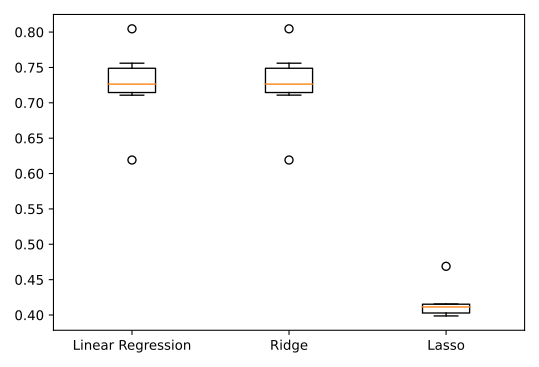
Nicely done! Lasso regression is not a good model for this problem, while linear regression and ridge perform fairly equally. Let’s make predictions on the test set, and see if the RMSE can guide us on model selection.
In the last exercise, linear regression and ridge appeared to produce similar results. It would be appropriate to select either of those models; however, you can check predictive performance on the test set to see if either one can outperform the other.
You will use root mean squared error (RMSE) as the metric. The dictionary models, containing the names and instances of the two models, has been preloaded for you along with the training and target arrays X_train_scaled, X_test_scaled, y_train, and y_test.
# Import mean_squared_error
from sklearn.metrics import mean_squared_error

for name, model in models.items():

  # Fit the model to the training data
  model.fit(X_train_scaled, y_train)

  # Make predictions on the test set
  y_pred = model.predict(X_test_scaled)

  # Calculate the test_rmse
  test_rmse = mean_squared_error(y_test, y_pred, squared=False)
  print("{} Test Set RMSE: {}".format(name, test_rmse))
Linear Regression Test Set RMSE: 0.11988851505947569
Ridge Test Set RMSE: 0.11987066103299668The linear regression model just edges the best performance, although the difference is a RMSE of 0.00001 for popularity! Now let’s look at classification model selection.
# Create models dictionary
models = {"Logistic Regression": LogisticRegression(), "KNN": KNeighborsClassifier(), "Decision Tree Classifier": DecisionTreeClassifier()}
results = []

# Loop through the models' values
for model in models.values():

  # Instantiate a KFold object
  kf = KFold(n_splits=6, random_state=12, shuffle=True)

  # Perform cross-validation
  cv_results = cross_val_score(model, X_train_scaled, y_train, cv=kf)
  results.append(cv_results)
plt.boxplot(results, labels=models.keys())
plt.show()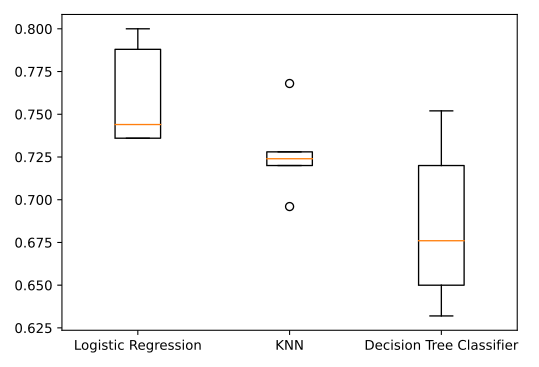
Looks like logistic regression is the best candidate based on the cross-validation results! Let’s wrap up by building a pipeline
For the final exercise, you will build a pipeline to impute missing values, scale features, and perform hyperparameter tuning of a logistic regression model. The aim is to find the best parameters and accuracy when predicting song genre!
All the models and objects required to build the pipeline have been preloaded for you.
# Create steps
steps = [("imp_mean", SimpleImputer()),
         ("scaler", StandardScaler()),
         ("logreg", LogisticRegression())]

# Set up pipeline
pipeline = Pipeline(steps)
params = {"logreg__solver": ["newton-cg", "saga", "lbfgs"],
         "logreg__C": np.linspace(0.001, 1.0, 10)}

# Create the GridSearchCV object
tuning = GridSearchCV(pipeline, param_grid=params)
tuning.fit(X_train, y_train)
y_pred = tuning.predict(X_test)

# Compute and print performance
print("Tuned Logistic Regression Parameters: {}, Accuracy: {}".format(tuning.best_params_, tuning.score(X_test, y_test)))
Tuned Logistic Regression Parameters: {'logreg__C': 0.112, 'logreg__solver': 'newton-cg'}, Accuracy: 0.82Excellent - you’ve selected a model, built a preprocessing pipeline, and performed hyperparameter tuning to create a model that is 82% accurate in predicting song genres!
Unsupervised Learning
Discovering patterns in unlabeled data, “learning without labels”
- natural clusters
- compressing data by dimension reduction
Iris dataset
datasets written as 2-D NumPy arrays
- columns: features/measurements
- rows: samples (individual Iris plants)
Iris data 4-dimensional (4 measurements)
Dimensions = # of features
Hard to visualize in 4D, but can still get insight
k-means clustering
from sklearn.cluster import KMeans

print(samples) # look at data

# instantiate model
model = KMeans(n_clusters = 3)

# run model
model.fit(samples)

# predict
labels = model.predict(samples) # returns a cluster label for each sample

print(labels)
If there are new samples (additional data), don’t have to start over, can use model’s predictions (remembers the mean of the samples in each cluster i.e. ‘centroids’) - new data are just assigned cluster whose centroid is closest
# new samples
print(new_samples)

# assign labels to new samples using the model
new_labels = model.predict(new_samples)
print(new_labels)
visualize clusters using scatterplots, color points by cluster
import matplotlib.pyplot as plt

# get coordinates of each sample (obs)
xs = samples[:,0] # sepal length in 0th column
ys = samples[:,2] # petal length is 2nd column

plt.scatter(xs, ys, c = labels) # color by cluster label
plt.show()
examples
From the scatter plot of the previous exercise, you saw that the points seem to separate into 3 clusters. You’ll now create a KMeans model to find 3 clusters, and fit it to the data points from the previous exercise. After the model has been fit, you’ll obtain the cluster labels for some new points using the .predict() method.
You are given the array points from the previous exercise, and also an array new_points.
# Import KMeans
from sklearn.cluster import KMeans

# Create a KMeans instance with 3 clusters: model
model = KMeans(n_clusters = 3)

# Fit model to points
model.fit(points)

# Determine the cluster labels of new_points: labels
labels = model.predict(new_points)

# Print cluster labels of new_points
print(labels)
[1 0 2 2 0 0 2 1 0 0 2 1 0 2 0 1 2 2 1 2 0 1 0 1 1 0 1 1 1 0 2 2 2 0 1 0 1
1 0 1 1 2 0 0 0 1 1 2 1 2 2 2 1 1 1 0 1 1 0 2 0 1 1 2 2 0 2 0 0 1 2 0 2 1
2 0 1 1 1 2 1 0 2 0 0 0 0 1 1 2 0 2 0 1 1 1 2 0 0 2 0 1 0 2 1 2 2 2 0 0 1
0 2 0 0 0 1 0 2 2 1 1 1 1 1 0 2 1 0 0 2 2 0 1 0 1 2 0 2 1 2 2 1 2 2 1 2 0
1 1 1 2 2 0 2 0 1 1 2 0 2 2 2 0 1 1 0 2 2 1 1 2 1 1 0 1 2 2 2 1 1 2 1 2 2
1 0 2 1 1 1 1 0 2 1 0 0 0 1 0 1 1 0 2 2 1 2 1 1 0 0 1 2 0 2 1 2 0 1 0 0 0
0 2 2 2 1 1 0 1 2 0 1 1 0 1 2 2 2 2 2 0 1 1 2 2 1 0 2 0 0 1 1 0 0 0 1 2 1
0 1 2 2 2 2 2 1 1 0 1 1 0 2 2 0 1 2 2 0 0 1 1 1 0 0 1 2 0 0 2 1 1 1 0 1 1
1 0 0 0]Great work! You’ve successfully performed k-Means clustering and predicted the labels of new points. But it is not easy to inspect the clustering by just looking at the printed labels. A visualization would be far more useful. In the next exercise, you’ll inspect your clustering with a scatter plot!
# Import pyplot
import matplotlib.pyplot as plt

# Assign the columns of new_points: xs and ys
xs = new_points[:,0]
ys = new_points[:,1]

# Make a scatter plot of xs and ys, using labels to define the colors
plt.scatter(xs, ys, c = labels, alpha = 0.5)

# Assign the cluster centers: centroids
centroids = model.cluster_centers_

# Assign the columns of centroids: centroids_x, centroids_y
centroids_x = centroids[:,0]
centroids_y = centroids[:,1]

# Make a scatter plot of centroids_x and centroids_y
plt.scatter(centroids_x, centroids_y, marker = 'D', s = 50)
plt.show()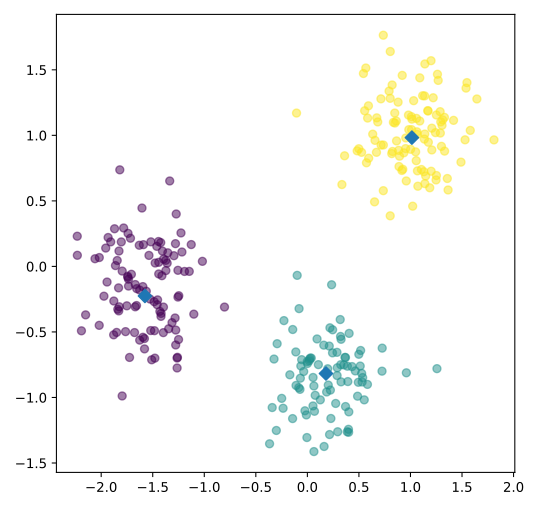
Fantastic! The clustering looks great! But how can you be sure that 3 clusters is the correct choice? In other words, how can you evaluate the quality of a clustering? Tune into the next video in which Ben will explain how to evaluate a clustering!
Evaluating a Cluster
Can do a cross-tabulation table (with pandas) to compare how many obs fall within a cluster and how many obs are a certain feature (e.g. species of iris)
print(species)

import pandas as pd
df = pd.DataFrame({'labels': labels,            # first column is cluster labels
                   'species': species})         # second column is iris species
print(df)

# use crosstab() function to build a cross tabulation
ct = pd.crosstab(df['labels'], df['species'])
print(ct)
but of course in most datasets, obs are not labeled (e.g. by species)
Good clustering has tight clusters, samples are bunched together not spread out - “inertia” measures how spread out the obs are within each cluster (lower is better), measures how far each sample is from its centroid - KMeans aims to minimize inertia
from sklearn.cluster import KMeans

model = KMeans(n_clusters = 3)
model.fit(samples)
print(model.inertia_)
Plot of the inertia values with different numbers of clusters (scree plot) - more clusters -> less inertia but at diminishing rate - what’s the optimal number of clusters to choose? A tradeoff: - good clustering has low inertia, but not too many clusters - good rule of thumb: choose “elbow” in inertia plot (where inertia begins to decrease more slowly)
examples
In the video, you learned how to choose a good number of clusters for a dataset using the k-means inertia graph. You are given an array samples containing the measurements (such as area, perimeter, length, and several others) of samples of grain. What’s a good number of clusters in this case?
KMeans and PyPlot (plt) have already been imported for you.
This dataset was sourced from the UCI Machine Learning Repository.
ks = range(1, 6)
inertias = []

for k in ks:
    # Create a KMeans instance with k clusters: model
    model = KMeans(n_clusters = k)

    # Fit model to samples
    model.fit(samples)

    # Append the inertia to the list of inertias
    inertias.append(model.inertia_)

# Plot ks vs inertias
plt.plot(ks, inertias, '-o')
plt.xlabel('number of clusters, k')
plt.ylabel('inertia')
plt.xticks(ks)
plt.show()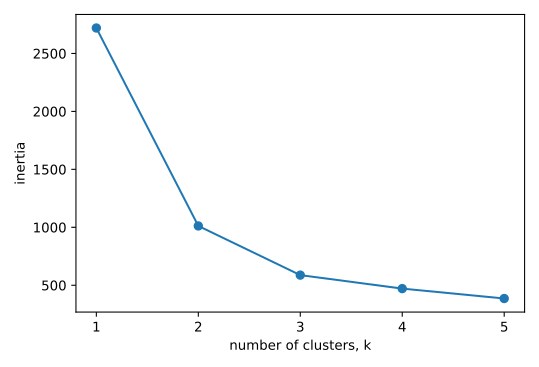
Excellent job! The inertia decreases very slowly from 3 clusters to 4, so it looks like 3 clusters would be a good choice for this data.
Use the .fit_predict() method of model to fit it to samples and derive the cluster labels. Using .fit_predict() is the same as using .fit() followed by .predict().
# Create a KMeans model with 3 clusters: model
model = KMeans(n_clusters = 3)

# Use fit_predict to fit model and obtain cluster labels: labels
labels = model.fit_predict(samples)

# Create a DataFrame with labels and varieties as columns: df
df = pd.DataFrame({'labels': labels, 'varieties': varieties})

# Create crosstab: ct
ct = pd.crosstab(df['labels'], df['varieties'])

# Display ct
print(ct)
varieties Canadian wheat Kama wheat Rosa wheat
labels
0 0 1 60
1 68 9 0
2 2 60 10Great work! The cross-tabulation shows that the 3 varieties of grain separate really well into 3 clusters. But depending on the type of data you are working with, the clustering may not always be this good. Is there anything you can do in such situations to improve your clustering? You’ll find out in the next video!
Scaling and Preprocessing
Features with very difference variances will affect the clustering; variance of a feature corresponds to its influence on the algorithm
Data must be transformed to features having equal variances with StandardScaler() -> standardizes so each features has mean 0 and variance 1
from sklearn.preprocessing import StandardScaler

scaler = StandardScaler()
StandardScaler(copy = True, with_mean = True, with_std = True)
samples_scaled = scaler.transform(samples)
can run in a pipeline
from sklearn.preprocessing import StandardScaler
from sklearn.cluster import KMeans
scaler = StandardScaler()
kmeans = KMeans(n_clusters = 3)
from sklearn.pipeline import make_pipeline
pipeline = make_pipeline(scaler, kmeans)
pipeline.fit(samples)
labels = pipeline.predict(samples)
example
As before, samples is the 2D array of fish measurements. Your pipeline is available as pipeline, and the species of every fish sample is given by the list species.
# Perform the necessary imports
from sklearn.pipeline import make_pipeline
from sklearn.preprocessing import StandardScaler
from sklearn.cluster import KMeans

# Create scaler: scaler
scaler = StandardScaler()

# Create KMeans instance: kmeans
kmeans = KMeans(n_clusters = 4)

# Create pipeline: pipeline
pipeline = make_pipeline(scaler, kmeans)
# Import pandas
import pandas as pd
# Fit the pipeline to samples
pipeline.fit(samples)
# Calculate the cluster labels: labels
labels = pipeline.predict(samples)
# Create a DataFrame with labels and species as columns: df
df = pd.DataFrame({'labels': labels, 'species': species})
# Create crosstab: ct
ct = pd.crosstab(df['labels'], df['species'])
# Display ct
print(ct)species Bream Pike Roach Smelt
labels
0 0 0 0 13
1 33 0 1 0
2 0 17 0 0
3 1 0 19 1Excellent! It looks like the fish data separates really well into 4 clusters!
In this exercise, you’ll cluster companies using their daily stock price movements (i.e. the dollar difference between the closing and opening prices for each trading day). You are given a NumPy array movements of daily price movements from 2010 to 2015 (obtained from Yahoo! Finance), where each row corresponds to a company, and each column corresponds to a trading day.
Some stocks are more expensive than others. To account for this, include a Normalizer at the beginning of your pipeline. The Normalizer will separately transform each company’s stock price to a relative scale before the clustering begins.
Note that Normalizer() is different to StandardScaler(), which you used in the previous exercise. While StandardScaler() standardizes features (such as the features of the fish data from the previous exercise) by removing the mean and scaling to unit variance, Normalizer() rescales each sample - here, each company’s stock price - independently of the other.
KMeans and make_pipeline have already been imported for you.
# Import Normalizer
from sklearn.preprocessing import Normalizer

# Create a normalizer: normalizer
normalizer = Normalizer()

# Create a KMeans model with 10 clusters: kmeans
kmeans = KMeans(n_clusters = 10)

# Make a pipeline chaining normalizer and kmeans: pipeline
pipeline = make_pipeline(normalizer, kmeans)

# Fit pipeline to the daily price movements
pipeline.fit(movements)

# Import pandas
import pandas as pd

# Predict the cluster labels: labels
labels = pipeline.predict(movements)

# Create a DataFrame aligning labels and companies: df
df = pd.DataFrame({'labels': labels, 'companies': companies})

# Display df sorted by cluster label
print(df.sort_values('labels'))
labels companies
59 0 Yahoo
15 0 Ford
35 0 Navistar
26 1 JPMorgan Chase
16 1 General Electrics
58 1 Xerox
11 1 Cisco
18 1 Goldman Sachs
20 1 Home Depot
5 1 Bank of America
3 1 American express
55 1 Wells Fargo
1 1 AIG
38 2 Pepsi
40 2 Procter Gamble
28 2 Coca Cola
27 2 Kimberly-Clark
9 2 Colgate-Palmolive
54 3 Walgreen
36 3 Northrop Grumman
29 3 Lookheed Martin
4 3 Boeing
0 4 Apple
47 4 Symantec
33 4 Microsoft
32 4 3M
31 4 McDonalds
30 4 MasterCard
50 4 Taiwan Semiconductor Manufacturing
14 4 Dell
17 4 Google/Alphabet
24 4 Intel
23 4 IBM
2 4 Amazon
51 4 Texas instruments
43 4 SAP
45 5 Sony
48 5 Toyota
21 5 Honda
22 5 HP
34 5 Mitsubishi
7 5 Canon
56 6 Wal-Mart
57 7 Exxon
44 7 Schlumberger
8 7 Caterpillar
10 7 ConocoPhillips
12 7 Chevron
13 7 DuPont de Nemours
53 7 Valero Energy
39 8 Pfizer
41 8 Philip Morris
25 8 Johnson & Johnson
49 9 Total
46 9 Sanofi-Aventis
37 9 Novartis
42 9 Royal Dutch Shell
19 9 GlaxoSmithKline
52 9 Unilever
6 9 British American TobaccoHierarchical Clustering
- t-SNE: creates a 2D map of a dataset, useful for conveying proximity of samples to each other
- hierarchical clustering with a dendrogram
Hierarchical clustering
- Agglomerative clustering:
- Begins with each sample as its own cluster
- Then at each step, the two closest clusters are merged, decreasing the number of clusters, until there is one left
- Divisive clustering: the other way around - from one to many
Use functions in SciPy to perform hierarchical clustering
Ex: given samples array of scores and country_names
import matplotlib.pyplot as plt
from scipy.cluster.hierarchy import linkage, dendrogram

# run the clustering with linkage()
mergings = linkage(samples, method = "complete")

# make dendrogram
dendrogram(mergings,
           labels = country_names,
           leaf_rotation = 90,
           leaf_font_size = 6)
plt.show()
Example
A sample of the grain measurements is provided in the array samples, while the variety of each grain sample is given by the list varieties.
# Perform the necessary imports
from scipy.cluster.hierarchy import linkage, dendrogram
import matplotlib.pyplot as plt

# Calculate the linkage: mergings
mergings = linkage(samples, method = "complete")

# Plot the dendrogram, using varieties as labels
dendrogram(mergings,
           labels=varieties,
           leaf_rotation=90,
           leaf_font_size=6,
)
plt.show()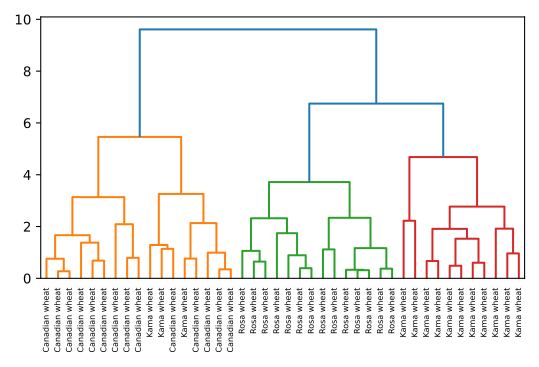
Now, you’ll perform hierarchical clustering of the companies. You are given a NumPy array of price movements movements, where the rows correspond to companies, and a list of the company names companies. SciPy hierarchical clustering doesn’t fit into a sklearn pipeline, so you’ll need to use the normalize() function from sklearn.preprocessing instead of Normalizer.
linkage and dendrogram have already been imported from scipy.cluster.hierarchy, and PyPlot has been imported as plt.
# Import normalize
from sklearn.preprocessing import normalize

# Normalize the movements: normalized_movements
normalized_movements = normalize(movements)

# Calculate the linkage: mergings
mergings = linkage(normalized_movements, method = "complete")

# Plot the dendrogram
dendrogram(mergings,
           labels=companies,
           leaf_rotation=90,
           leaf_font_size=6,
)
plt.show()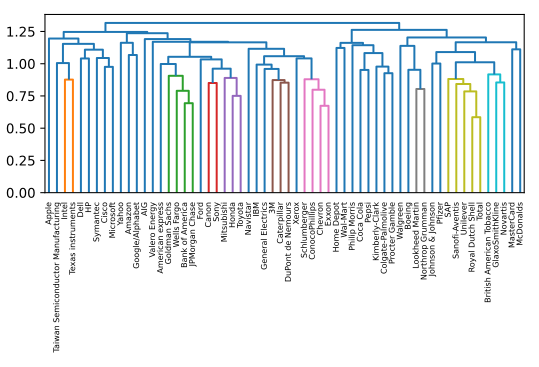
Extracting Cluster Labels
Can extract cluster labels from the dendrogram for use in e.g. crosstabulation tables
An intermediate stage in hierarchical clustering is specified by choosing a height on the dendrogram - Height: distance between merging clusters
Chosen height = max. distance between clusters (e.g. stop at 12)
Distance between clusters is measured by a linkage method - “complete”: distance between clusters = max of the distances between their samples - “single”: distance between clusters = closest distance between samples
Extracting cluster labels using fcluster(), returns a NumPy array of cluster labels
from scipy.cluster.hierarchy import linkage
mergings = linkage(samples, method = "complete")
from scipy.cluster.hierarchy import fcluster
labels = fcluster(mergings, 15, criterion = "distance")         # specified height of 15
print(labels)
to inspect labels, assign dataframe
import pandas as pd
pairs = pd.DataFrame({'labels': labels, 'countries': country_names})
print(pairs.sort_values('labels'))
note the labels start at 1, not 0 (0 in scikit-learn)
examples
# Perform the necessary imports
import matplotlib.pyplot as plt
from scipy.cluster.hierarchy import linkage, dendrogram

# Calculate the linkage: mergings
mergings = linkage(samples, method = "single")

# Plot the dendrogram
dendrogram(mergings,
           labels=country_names,
           leaf_rotation=90,
           leaf_font_size=6,
)
plt.show()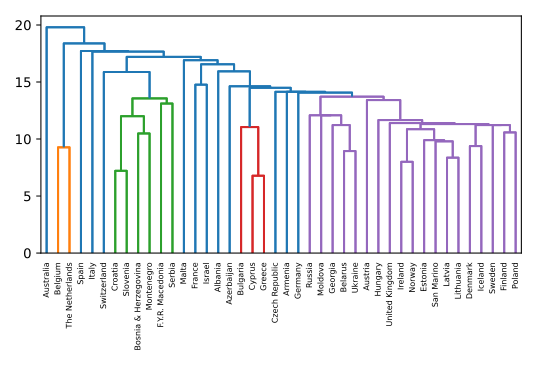
In the previous exercise, you saw that the intermediate clustering of the grain samples at height 6 has 3 clusters. Now, use the fcluster() function to extract the cluster labels for this intermediate clustering, and compare the labels with the grain varieties using a cross-tabulation.
The hierarchical clustering has already been performed and mergings is the result of the linkage() function. The list varieties gives the variety of each grain sample. Perform a flat hierarchical clustering by using the fcluster() function on mergings. Specify a maximum height of 6 and the keyword argument criterion=‘distance’.
# Perform the necessary imports
import pandas as pd
from scipy.cluster.hierarchy import fcluster

# Use fcluster to extract labels: labels
labels = fcluster(mergings, 6, criterion = "distance")

# Create a DataFrame with labels and varieties as columns: df
df = pd.DataFrame({'labels': labels, 'varieties': varieties})

# Create crosstab: ct
ct = pd.crosstab(df['labels'], df['varieties'])

# Display ct
print(ct)
print(ct)
varieties Canadian wheat Kama wheat Rosa wheat
labels
1 14 3 0
2 0 0 14
3 0 11 0t-SNE
“tee-snee”, “t-distributed stochastic neighbor embedding (T-SNE)”, maps samples from a higher dimensional space into a 2- or 3-D space so they can be visualized
- does a great job of approximately representing the distances between samples
Ex on iris dataset
samples2-D numpy array with listspeciesfor each sampleTSNE has no separate
.fit()and.transform()methods, they are combined as.fit_transform()- Can’t extend the model to include new data - instead must start over each time
Learning rate must be adjusted
- Clear when made a bad choice -> all samples will appear bunched together in scatterplot
- Normally sufficient to try a few values between 50 and 200
Axes of T-SNE plot don’t have any interpretable meaning
- They are different every time T-SNE is applied, even on same data!
import matplotlib.pyplot as plt
from sklearn.manifold import TSNE

model = TSNE(learning_rate = 100)
transformed = model.fit_transform(samples)

xs = transformed[:,0]
ys = transformed[:,1]

plt.scatter(xs, ys, c = species)
plt.show()
example
In the video, you saw t-SNE applied to the iris dataset. In this exercise, you’ll apply t-SNE to the grain samples data and inspect the resulting t-SNE features using a scatter plot. You are given an array samples of grain samples and a list variety_numbers giving the variety number of each grain sample.
# Import TSNE
from sklearn.manifold import TSNE

# Create a TSNE instance: model
model = TSNE(learning_rate = 200)

# Apply fit_transform to samples: tsne_features
tsne_features = model.fit_transform(samples)

# Select the 0th feature: xs
xs = tsne_features[:,0]

# Select the 1st feature: ys
ys = tsne_features[:,1]

# Scatter plot, coloring by variety_numbers
plt.scatter(xs, ys, c = variety_numbers)
plt.show()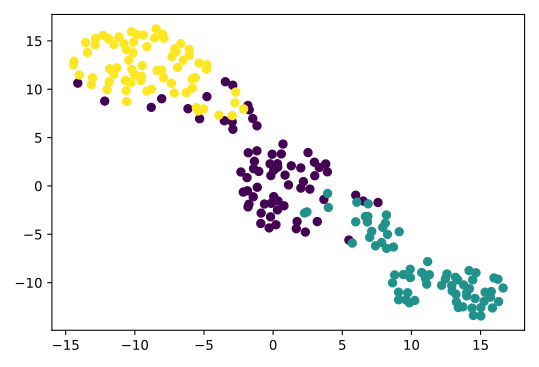
Excellent! As you can see, the t-SNE visualization manages to separate the 3 varieties of grain samples. But how will it perform on the stock data? You’ll find out in the next exercise!
t-SNE provides great visualizations when the individual samples can be labeled. In this exercise, you’ll apply t-SNE to the company stock price data. A scatter plot of the resulting t-SNE features, labeled by the company names, gives you a map of the stock market! The stock price movements for each company are available as the array normalized_movements (these have already been normalized for you). The list companies gives the name of each company. PyPlot (plt) has been imported for you.
# Import TSNE
from sklearn.manifold import TSNE

# Create a TSNE instance: model
model = TSNE(learning_rate = 50)

# Apply fit_transform to normalized_movements: tsne_features
tsne_features = model.fit_transform(normalized_movements)

# Select the 0th feature: xs
xs = tsne_features[:,0]

# Select the 1th feature: ys
ys = tsne_features[:,1]

# Scatter plot
plt.scatter(xs, ys, alpha = 0.5)

# Annotate the points
for x, y, company in zip(xs, ys, companies):
    plt.annotate(company, (x, y), fontsize=5, alpha=0.75)
plt.show()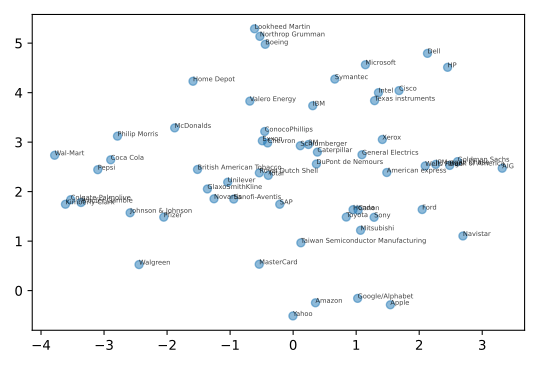
Fantastic! It’s visualizations such as this that make t-SNE such a powerful tool for extracting quick insights from high dimensional data.
Principal Component Analysis
Dimension reduction finds patterns in data and uses them to reexpress it in a compressed form, making subsequent computation much more efficient
Most important to reduce data to most essential components, remove less informative “noise” features (which make classification & regression models worse)
PCA performs dimension reduction in two steps:
- “Decorrelation” - rotates samples so they are aligned with the coordinate axes and shifts samples so they have mean 0
- no information is lost, doesn’t change the dimension of data
- features are uncorrelated (unlike features in original data)
- Reduces dimension
- “Decorrelation” - rotates samples so they are aligned with the coordinate axes and shifts samples so they have mean 0
scikit-learncompoennt likeKMeansandStandardScaler, uses.fit()to learn transformation from data,.transform()applies the transformation from the fitted model and can be applied to new unseen samples
from sklearn.decomposition import PCA

model = PCA()
model.fit(samples)

transformed = model.transform(samples)

# new array of transformed samples
print(transformed)
returns same # rows as original samples, columns correspond to PCA features
PCA learns the “principal components” of the data, the directions in which the samples vary the most, this is what PCA aligns with the coordinate axes, principle components are available as
components_attribute
print(model.components_)example
# Perform the necessary imports
import matplotlib.pyplot as plt
from scipy.stats import pearsonr

# Assign the 0th column of grains: width
width = grains[:,0]

# Assign the 1st column of grains: length
length = grains[:,1]

# Scatter plot width vs length
plt.scatter(width, length)
plt.axis('equal')
plt.show()

# Calculate the Pearson correlation
correlation, pvalue = pearsonr(width, length)

# Display the correlation
print(correlation)
0.8604149377143469
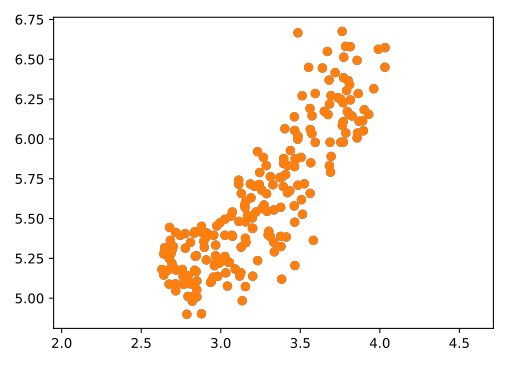
Great work! As you would expect, the width and length of the grain samples are highly correlated.
You observed in the previous exercise that the width and length measurements of the grain are correlated. Now, you’ll use PCA to decorrelate these measurements, then plot the decorrelated points and measure their Pearson correlation.
# Import PCA
from sklearn.decomposition import PCA

# Create PCA instance: model
model = PCA()

# Apply the fit_transform method of model to grains: pca_features
pca_features = model.fit_transform(grains)

# Assign 0th column of pca_features: xs
xs = pca_features[:,0]

# Assign 1st column of pca_features: ys
ys = pca_features[:,1]

# Scatter plot xs vs ys
plt.scatter(xs, ys)
plt.axis('equal')
plt.show()

# Calculate the Pearson correlation of xs and ys
correlation, pvalue = pearsonr(xs, ys)

# Display the correlation
print(correlation)
5.4909917646575975e-17
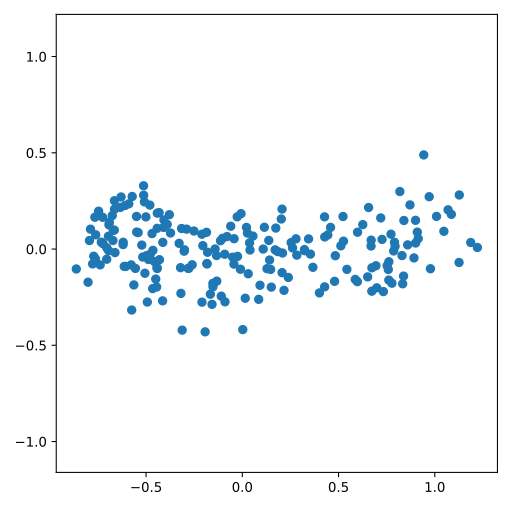
Intrinsic Dimension
“Intrinsic” dimension of a dataset is number of features required to approximate it - informs dimension reduction, since it determines how much a dataset can be compressed - can be detected with PCA, by counting those PCA features that have high variance - can be ambiguous, no clear cutoff
- PCA rotates & shifts samples to align with coordinate axes
- Features are in a special order - highest variance first
import matplotlib.pyplot as plt
from sklearn.decomposition import PCA
pca = PCA()
pca.fit(samples)

# create a range enumerating PCA features
features = range(pca.n_components_)

# make a bar plot of features
plt.bar(features, pca.explained_variance_)          # variance is .explained_variance_ attribute
plt.xticks(features)
plt.ylabel('variance')
plt.xlabel('PCA features')
plt.show()
examples
The first principal component of the data is the direction in which the data varies the most. In this exercise, your job is to use PCA to find the first principal component of the length and width measurements of the grain samples, and represent it as an arrow on the scatter plot.
The array grains gives the length and width of the grain samples. PyPlot (plt) and PCA have already been imported for you.
# Make a scatter plot of the untransformed points
plt.scatter(grains[:,0], grains[:,1])

# Create a PCA instance: model
model = PCA()

# Fit model to points
model.fit(grains)

# Get the mean of the grain samples: mean
mean = model.mean_

# Get the first principal component: first_pc
first_pc = model.components_[0,:]

# Plot first_pc as an arrow, starting at mean
plt.arrow(mean[0], mean[1], first_pc[0], first_pc[1], color='red', width=0.01)

# Keep axes on same scale
plt.axis('equal')
plt.show()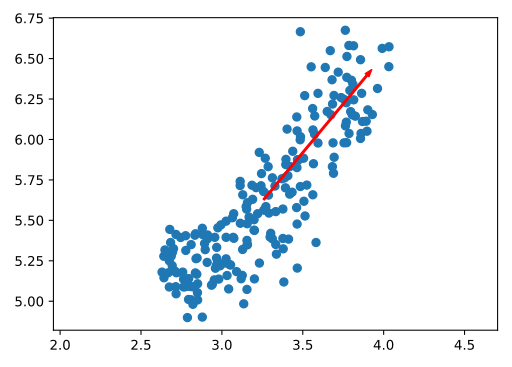
Excellent job! This is the direction in which the grain data varies the most.
Variance of the PCA features
The fish dataset is 6-dimensional. But what is its intrinsic dimension? Make a plot of the variances of the PCA features to find out. As before, samples is a 2D array, where each row represents a fish. You’ll need to standardize the features first.
# Perform the necessary imports
from sklearn.decomposition import PCA
from sklearn.preprocessing import StandardScaler
from sklearn.pipeline import make_pipeline
import matplotlib.pyplot as plt

# Create scaler: scaler
scaler = StandardScaler()

# Create a PCA instance: pca
pca = PCA()

# Create pipeline: pipeline
pipeline = make_pipeline(scaler, pca)

# Fit the pipeline to 'samples'
pipeline.fit(samples)

# Plot the explained variances
features = range(pca.n_components_)
plt.bar(features, pca.explained_variance_)
plt.xlabel('PCA feature')
plt.ylabel('variance')
plt.xticks(features)
plt.show()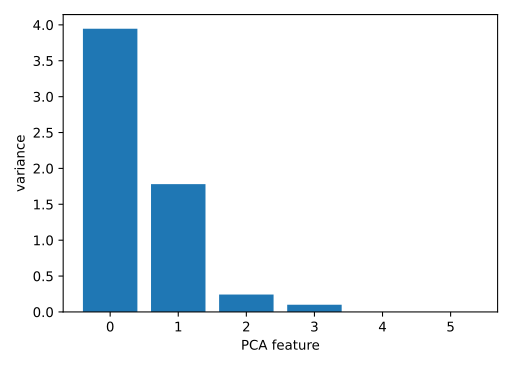
Great work! It looks like PCA features 0 and 1 have significant variance.
Great job! Since PCA features 0 and 1 have significant variance, the intrinsic dimension of this dataset appears to be 2.
Dimension Reduction
Dimension reduction represents same data with fewer features
To use PCA for dimension reduction, need to specify how many PCA features to keep,
PCA(n_components = 2)- a good choice is the number of intrinsic dimensions, if known
# iris example
from sklearn.decomposition import PCA
pca = PCA(n_components = 2)
pca.fit(samples)

transformed = pca.transform(samples)
print(transformed.shape)

# scatterplot
xs = transformed[:,0]
ys = transformed[:,1]
plt.scatter(xs, ys, c = species)
plt.show()
alternative to PCA, word frequency arrays, for example - rows represent documents, columns represent words (from fixed vocabulary) - measure how often each word appears in each document, with tf-idf - most words are sparse (0s) - scipy.sparse.csr_matrix use csr_matrix instead of numpy array - save space by remembering only non-zero entries of the array - scikit-learn’s PCA doesn’t support csr_matrices, instead need to use TruncatedSVD
from sklearn.decomposition import TruncatedSVD
model = TruncatedSVD(n_components = 3)
model.fit(documents)                    # documents in csr_matrix
transformed = model.transform(documents)
examples
Dimension reduction of the fish measurements
In a previous exercise, you saw that 2 was a reasonable choice for the “intrinsic dimension” of the fish measurements. Now use PCA for dimensionality reduction of the fish measurements, retaining only the 2 most important components.
The fish measurements have already been scaled for you, and are available as scaled_samples.
# Import PCA
from sklearn.decomposition import PCA

# Create a PCA model with 2 components: pca
pca = PCA(n_components = 2)

# Fit the PCA instance to the scaled samples
pca.fit(scaled_samples)

# Transform the scaled samples: pca_features
pca_features = pca.transform(scaled_samples)

# Print the shape of pca_features
print(pca_features.shape)
(85, 2)
Superb! You’ve successfully reduced the dimensionality from 6 to 2.
A tf-idf word-frequency array
In this exercise, you’ll create a tf-idf word frequency array for a toy collection of documents. For this, use the TfidfVectorizer from sklearn. It transforms a list of documents into a word frequency array, which it outputs as a csr_matrix. It has fit() and transform() methods like other sklearn objects.
You are given a list documents of toy documents about pets. Its contents have been printed in the IPython Shell. Apply .fit_transform() method of tfidf to documents and assign the result to csr_mat. This is a word-frequency array in csr_matrix format.
# Import TfidfVectorizer
from sklearn.feature_extraction.text import TfidfVectorizer

# Create a TfidfVectorizer: tfidf
tfidf = TfidfVectorizer()

# Apply fit_transform to document: csr_mat
csr_mat = tfidf.fit_transform(documents)

# Print result of toarray() method
print(csr_mat.toarray())

# Get the words: words
words = tfidf.get_feature_names()

# Print words
print(words)[[0.51785612 0. 0. 0.68091856 0.51785612 0. ]
[0. 0. 0.51785612 0. 0.51785612 0.68091856]
[0.51785612 0.68091856 0.51785612 0. 0. 0. ]]
['cats', 'chase', 'dogs', 'meow', 'say', 'woof']Great work! You’ll now move to clustering Wikipedia articles!
You saw in the video that TruncatedSVD is able to perform PCA on sparse arrays in csr_matrix format, such as word-frequency arrays. Combine your knowledge of TruncatedSVD and k-means to cluster some popular pages from Wikipedia. In this exercise, build the pipeline. In the next exercise, you’ll apply it to the word-frequency array of some Wikipedia articles.
Create a Pipeline object consisting of a TruncatedSVD followed by KMeans. (This time, we’ve precomputed the word-frequency matrix for you, so there’s no need for a TfidfVectorizer).
The Wikipedia dataset you will be working with was obtained from here.
# Perform the necessary imports
from sklearn.decomposition import TruncatedSVD
from sklearn.cluster import KMeans
from sklearn.pipeline import make_pipeline

# Create a TruncatedSVD instance: svd
svd = TruncatedSVD(n_components = 50)

# Create a KMeans instance: kmeans
kmeans = KMeans(n_clusters =6)

# Create a pipeline: pipeline
pipeline = make_pipeline(svd, kmeans)
Excellent! Now that you have set up your pipeline, you will use it in the next exercise to cluster the articles.
It is now time to put your pipeline from the previous exercise to work! You are given an array articles of tf-idf word-frequencies of some popular Wikipedia articles, and a list titles of their titles. Use your pipeline to cluster the Wikipedia articles.
A solution to the previous exercise has been pre-loaded for you, so a Pipeline pipeline chaining TruncatedSVD with KMeans is available.
# Import pandas
import pandas as pd

# Fit the pipeline to articles
pipeline.fit(articles)

# Calculate the cluster labels: labels
labels = pipeline.predict(artices)

# Create a DataFrame aligning labels and titles: df
df = pd.DataFrame({'label': labels, 'article': titles})

# Display df sorted by cluster label
print(df.sort_values('label'))
label article
59 0 Adam Levine
57 0 Red Hot Chili Peppers
56 0 Skrillex
55 0 Black Sabbath
54 0 Arctic Monkeys
53 0 Stevie Nicks
52 0 The Wanted
51 0 Nate Ruess
50 0 Chad Kroeger
58 0 Sepsis
0 1 HTTP 404
6 1 Hypertext Transfer Protocol
9 1 LinkedIn
8 1 Firefox
7 1 Social search
5 1 Tumblr
4 1 Google Search
3 1 HTTP cookie
2 1 Internet Explorer
1 1 Alexa Internet
10 2 Global warming
11 2 Nationally Appropriate Mitigation Action
18 2 2010 United Nations Climate Change Conference
17 2 Greenhouse gas emissions by the United States
16 2 350.org
15 2 Kyoto Protocol
14 2 Climate change
13 2 Connie Hedegaard
19 2 2007 United Nations Climate Change Conference
12 2 Nigel Lawson
42 3 Doxycycline
43 3 Leukemia
44 3 Gout
48 3 Gabapentin
46 3 Prednisone
47 3 Fever
49 3 Lymphoma
41 3 Hepatitis B
45 3 Hepatitis C
40 3 Tonsillitis
35 4 Colombia national football team
38 4 Neymar
37 4 Football
36 4 2014 FIFA World Cup qualification
34 4 Zlatan Ibrahimović
33 4 Radamel Falcao
32 4 Arsenal F.C.
31 4 Cristiano Ronaldo
30 4 France national football team
39 4 Franck Ribéry
20 5 Angelina Jolie
21 5 Michael Fassbender
22 5 Denzel Washington
23 5 Catherine Zeta-Jones
27 5 Dakota Fanning
25 5 Russell Crowe
26 5 Mila Kunis
28 5 Anne Hathaway
24 5 Jessica Biel
29 5 Jennifer AnistonFantastic! Take a look at the cluster labels and see if you can identify any patterns!
Interpretable Features
Non-negative matrix factorization (NMF)
- NMF, like PCA, is a dimension reduction technique, but unlike PCA, NMF are interpretable
- Can’t be applied to every dataset - requires sample features be non-negative (>=0)
- Decomposes samples as sums of their parts
- e.g. documents as combinations of common themes
- e.g. images to combinations of common patterns
- in scikit-learn, follows same
.fit()/.transform()pattern as PCA- but must always specify desired number of components
- works with NumPy arrays and csr_matrix
Example word frequency array, 4 words, many documents - Measure presence of words in each document using tf-idf - tf: frequency of word in document - (e.g. if 10% of words in document are datacamp then tf of datacamp for that document is 0.1) - idf: reduces influence of frequent words (like the)
from sklearn.decomposition import NMF
model = NMF(n_components = 2)
model.fit(samples)

nmf_features = model.transform(samples)

print(model.components_)
print(nmf_features)
like PCA, NMF has components, dimensions of components = dimension of samples - components and features are always nonnegative - features & components of an NMF model can be combined to approx reconstruct the original data samples
Example reconstructing a single sample
print(samples[i,:])
# [ 0.12 0.18 0.32 0.14]

print(nmf_features[i,:])
# [ 0.15 0.12]
multiply each NMF component (model.components_) by corresponding NMF feature and add up: a product of matrices, this is the “matrix factorization” comes from
Examples
NMF applied to Wikipedia articles
In the video, you saw NMF applied to transform a toy word-frequency array. Now it’s your turn to apply NMF, this time using the tf-idf word-frequency array of Wikipedia articles, given as a csr matrix articles. Here, fit the model and transform the articles. In the next exercise, you’ll explore the result.
# Import NMF
from sklearn.decomposition import NMF

# Create an NMF instance: model
model = NMF(n_components = 6)

# Fit the model to articles
model.fit(articles)

# Transform the articles: nmf_features
nmf_features = model.transform(articles)

# Print the NMF features
print(nmf_features.round(2))[[0. 0. 0. 0. 0. 0.44]
[0. 0. 0. 0. 0. 0.57]
[0. 0. 0. 0. 0. 0.4 ]
[0. 0. 0. 0. 0. 0.38]
[0. 0. 0. 0. 0. 0.49]
[0.01 0.01 0.01 0.03 0. 0.33]
[0. 0. 0.02 0. 0.01 0.36]
[0. 0. 0. 0. 0. 0.49]
[0.02 0.01 0. 0.02 0.03 0.48]
[0.01 0.03 0.03 0.07 0.02 0.34]
[0. 0. 0.53 0. 0.03 0. ]
[0. 0. 0.36 0. 0. 0. ]
[0.01 0.01 0.31 0.06 0.01 0.02]
[0. 0.01 0.34 0.01 0. 0. ]
[0. 0. 0.43 0. 0.04 0. ]
[0. 0. 0.48 0. 0. 0. ]
[0.01 0.02 0.38 0.03 0. 0.01]
[0. 0. 0.48 0. 0. 0. ]
[0. 0.01 0.55 0. 0. 0. ]
[0. 0. 0.47 0. 0. 0. ]
[0. 0.01 0.02 0.52 0.06 0.01]
[0. 0. 0. 0.51 0. 0. ]
[0. 0.01 0. 0.42 0. 0. ]
[0. 0. 0. 0.44 0. 0. ]
[0. 0. 0. 0.5 0. 0. ]
[0.1 0.09 0. 0.38 0. 0.01]
[0. 0. 0. 0.57 0. 0.01]
[0.01 0.01 0. 0.47 0. 0.01]
[0. 0. 0. 0.58 0. 0. ]
[0. 0. 0. 0.53 0.01 0.01]
[0. 0.41 0. 0. 0. 0. ]
[0. 0.61 0. 0.01 0. 0. ]
[0.01 0.26 0. 0.02 0.01 0. ]
[0. 0.64 0. 0. 0. 0. ]
[0. 0.61 0. 0. 0. 0. ]
[0. 0.34 0. 0. 0. 0. ]
[0.01 0.32 0.02 0. 0.01 0. ]
[0.01 0.21 0.01 0.05 0.02 0.01]
[0.01 0.47 0. 0.02 0. 0. ]
[0. 0.64 0. 0. 0. 0. ]
[0. 0. 0. 0. 0.48 0. ]
[0. 0. 0. 0. 0.49 0. ]
[0. 0. 0. 0. 0.38 0.01]
[0. 0. 0. 0.01 0.54 0. ]
[0. 0. 0.01 0. 0.42 0. ]
[0. 0. 0. 0. 0.51 0. ]
[0. 0. 0. 0. 0.37 0. ]
[0. 0. 0.04 0. 0.23 0. ]
[0.01 0. 0.02 0.01 0.33 0.04]
[0. 0. 0. 0. 0.42 0. ]
[0.31 0. 0. 0. 0. 0. ]
[0.37 0. 0. 0. 0. 0. ]
[0.4 0.03 0. 0.02 0. 0.02]
[0.38 0. 0. 0.04 0. 0.01]
[0.44 0. 0. 0. 0. 0. ]
[0.46 0. 0. 0. 0. 0. ]
[0.28 0. 0. 0.05 0. 0.02]
[0.45 0. 0. 0. 0.01 0. ]
[0.29 0.01 0.01 0.01 0.19 0.01]
[0.38 0.01 0. 0.1 0.01 0. ]]Now you will explore the NMF features you created in the previous exercise. A solution to the previous exercise has been pre-loaded, so the array nmf_features is available. Also available is a list titles giving the title of each Wikipedia article.
When investigating the features, notice that for both actors, the NMF feature 3 has by far the highest value. This means that both articles are reconstructed using mainly the 3rd NMF component. In the next video, you’ll see why: NMF components represent topics (for instance, acting!).
# Import pandas
import pandas as pd

# Create a pandas DataFrame: df
df = pd.DataFrame({'features': nmf_features, index = titles})

# Print the row for 'Anne Hathaway'
print(df.loc['Anne Hathaway'])

# Print the row for 'Denzel Washington'
print(df.loc['Denzel Washington'])
0 0.004
1 0.000
2 0.000
3 0.576
4 0.000
5 0.000
Name: Anne Hathaway, dtype: float64
0 0.000
1 0.006
2 0.000
3 0.422
4 0.000
5 0.000
Name: Denzel Washington, dtype: float64Great work! Notice that for both actors, the NMF feature 3 has by far the highest value. This means that both articles are reconstructed using mainly the 3rd NMF component. In the next video, you’ll see why: NMF components represent topics (for instance, acting!).
NMF Learns Interpretable Parts
Components of NMF represent patterns that frequently occur in the samples
e.g consider 20,000 scientific articles represented by their word frequencies of 8,000 words
10 components, (10 rows) for 8000 words, components live in an 800-dimensional space, one dimension for each of the words
Aligning the words of the vocabulary with the columns of the NMF components allows them to be interpreted - Choosing a component and looking at which words have the highest values - see words that fit a theme, e.g. ‘species’ ‘plant’ ‘genetic’ ‘evolution’ etc - So NMF components represent topics - NMF features combine topics into documents
For images, NMF components are parts (patterns frequently occuring in) of images
To represent a collection of images as a non-negative array - Grayscale image: no color, only shades of gray - measure pixel brightness (0 black - 1 white) - Enumerate the entries, e.g. read from row-by-row, left-to-right, top-to-bottom - Collect images the same size to encode as a 2D array - each row: image as flattened array - each column: a pixel - very similar to words & documents, can apply NMF
print(sample) # sample is the images
# recover the image
bitmap = sample.reshape((2,3)) # specify dimensions of original image as a tuple
print(bitmap)

# to display image, using pyplot
plt.imshow(bitmap, cmap = 'gray', interpolation = 'nearest')
plt.show()
Example
NMF learns topics of documents
In the video, you learned when NMF is applied to documents, the components correspond to topics of documents, and the NMF features reconstruct the documents from the topics. Verify this for yourself for the NMF model that you built earlier using the Wikipedia articles. Previously, you saw that the 3rd NMF feature value was high for the articles about actors Anne Hathaway and Denzel Washington. In this exercise, identify the topic of the corresponding NMF component.
The NMF model you built earlier is available as model, while words is a list of the words that label the columns of the word-frequency array.
After you are done, take a moment to recognize the topic that the articles about Anne Hathaway and Denzel Washington have in common!
# Import pandas
import pandas as pd

# Create a DataFrame: components_df
components_df = pd.DataFrame(model.components_, columns = words)

# Print the shape of the DataFrame
print(components_df.shape)

# Select row 3: component
component = components_df.iloc[3]

# Print result of nlargest
print(component.nlargest())
(6, 13125)
film 0.628
award 0.253
starred 0.245
role 0.211
actress 0.186
Name: 2, dtype: float64Great work! Take a moment to recognise the topics that the articles about Anne Hathaway and Denzel Washington have in common!
Explore the LED digits dataset
In the following exercises, you’ll use NMF to decompose grayscale images into their commonly occurring patterns. Firstly, explore the image dataset and see how it is encoded as an array. You are given 100 images as a 2D array samples, where each row represents a single 13x8 image. The images in your dataset are pictures of a LED digital display.
[Remember that since samples is a NumPy array, you can’t use the .loc[] or iloc[] accessors to select specific rows or columns.]
# Import pyplot
from matplotlib import pyplot as plt

# Select the 0th row: digit
digit = samples[0,:]

# Print digit
print(digit)

# Reshape digit to a 13x8 array: bitmap
bitmap = digit.reshape(13,8)

# Print bitmap
print(bitmap)

# Use plt.imshow to display bitmap
plt.imshow(bitmap, cmap='gray', interpolation='nearest')
plt.colorbar()
plt.show()
[0. 0. 0. 0. 0. 0. 0. 0. 0. 0. 1. 1. 1. 1. 0. 0. 0. 0. 0. 0. 0. 0. 1. 0.
0. 0. 0. 0. 0. 0. 1. 0. 0. 0. 0. 0. 0. 0. 1. 0. 0. 0. 0. 0. 0. 0. 1. 0.
0. 0. 0. 0. 0. 0. 0. 0. 0. 0. 0. 0. 0. 0. 1. 0. 0. 0. 0. 0. 0. 0. 1. 0.
0. 0. 0. 0. 0. 0. 1. 0. 0. 0. 0. 0. 0. 0. 1. 0. 0. 0. 0. 0. 0. 0. 0. 0.
0. 0. 0. 0. 0. 0. 0. 0.]
[[0. 0. 0. 0. 0. 0. 0. 0.]
[0. 0. 1. 1. 1. 1. 0. 0.]
[0. 0. 0. 0. 0. 0. 1. 0.]
[0. 0. 0. 0. 0. 0. 1. 0.]
[0. 0. 0. 0. 0. 0. 1. 0.]
[0. 0. 0. 0. 0. 0. 1. 0.]
[0. 0. 0. 0. 0. 0. 0. 0.]
[0. 0. 0. 0. 0. 0. 1. 0.]
[0. 0. 0. 0. 0. 0. 1. 0.]
[0. 0. 0. 0. 0. 0. 1. 0.]
[0. 0. 0. 0. 0. 0. 1. 0.]
[0. 0. 0. 0. 0. 0. 0. 0.]
[0. 0. 0. 0. 0. 0. 0. 0.]]
NMF learns the parts of images
Now use what you’ve learned about NMF to decompose the digits dataset. You are again given the digit images as a 2D array samples. This time, you are also provided with a function show_as_image() that displays the image encoded by any 1D array:
def show_as_image(sample):
    bitmap = sample.reshape((13, 8))
    plt.figure()
    plt.imshow(bitmap, cmap='gray', interpolation='nearest')
    plt.colorbar()
    plt.show()
After you are done, take a moment to look through the plots and notice how NMF has expressed the digit as a sum of the components!
# Import NMF
from sklearn.decomposition import NMF

# Create an NMF model: model
model = NMF(n_components = 7)

# Apply fit_transform to samples: features
features = model.fit_transform(samples)

# Call show_as_image on each component
for component in model.components_:
    show_as_image(component)

# Select the 0th row of features: digit_features
digit_features = features[0,:]

# Print digit_features
print(digit_features)
[4.76823559e-01 0.00000000e+00 0.00000000e+00 5.90605054e-01 4.81559442e-01 0.00000000e+00 7.37551667e-16]
Great work! Take a moment to look through the plots and notice how NMF has expressed the digit as a sum of the components!
PCA doesn’t learn parts
Unlike NMF, PCA doesn’t learn the parts of things. Its components do not correspond to topics (in the case of documents) or to parts of images, when trained on images. Verify this for yourself by inspecting the components of a PCA model fit to the dataset of LED digit images from the previous exercise. The images are available as a 2D array samples. Also available is a modified version of the show_as_image() function which colors a pixel red if the value is negative.
After submitting the answer, notice that the components of PCA do not represent meaningful parts of images of LED digits!
# Import PCA
from sklearn.decomposition import PCA

# Create a PCA instance: model
model = PCA(n_components = 7)

# Apply fit_transform to samples: features
features = model.fit_transform(samples)

# Call show_as_image on each component
for component in model.components_:
    show_as_image(component)
Great work! Notice that the components of PCA do not represent meaningful parts of images of LED digits!
Building a Recommendation System
- Recommend articles similar to article being read currently
- Given an article, how can you find articles that have similar topics
- Strategy: apply NMF to word-frequency array and use resulting NMF features
- NMF features describe the topic mixture of an article, so similar documents have similar NMF feature values
articles a word frequency array
from sklearn.decomposition import NMF
nmf = NMF(n_components = 6)
nmf_features = nmf.fit_transform(articles)
Similar documents have similar topics, but not necessarily that NMF feature values will be exactly the same - one version of a document might be wordier and have meaningless fluff (reducing frequency of topic words, and therefore reducing NMF feature values representing the topics) - on a scatterplot of NMF features, all these versions would lie on a single line passing through the origin - when comparing two documents, good idea to compare these lines, using cosine similarity, which measures the angle between the two lines - higher values -> greater similarity - max value is 1, when angle is 0 - normalize array of NMF features
from sklearn.preprocessing import normalize
# normalize features
norm_features = normalize(nmf_features)

# select the row corresponding to current article
# e.g. if has index 23
current_article = norm_features[23,:]

# pass to .dot() method of array ofall  ormalized features
similarities = norm_features.dot(current_article)

print(similarities)

# can label similarities with article titles using a DF
# titles given as a list: titles

import pandas as pd
norm_features = normalize(nmf_features)
df = pd.DataFrame(norm_features, index = titles)

current_article = df.loc['Dog bites man']
similarities = df.dot(current_article)

# find articles with highest similarity to current one (dog bites man)
print(similarities.nlargest())
Dog bites man 1.000000
Hound mauls cat 0.979946
Pets go wild! 0.979708
Dacschunds are dangerous 0.949641examples
Which articles are similar to ‘Cristiano Ronaldo’?
In the video, you learned how to use NMF features and the cosine similarity to find similar articles. Apply this to your NMF model for popular Wikipedia articles, by finding the articles most similar to the article about the footballer Cristiano Ronaldo. The NMF features you obtained earlier are available as nmf_features, while titles is a list of the article titles.
# Perform the necessary imports
import pandas as pd
from sklearn.preprocessing import normalize

# Normalize the NMF features: norm_features
norm_features = normalize(nmf_features)

# Create a DataFrame: df
df = pd.DataFrame(norm_features, index = titles)

# Select the row corresponding to 'Cristiano Ronaldo': article
article = df.loc['Cristiano Ronaldo']

# Compute the dot products: similarities
similarities = df.dot(article)

# Display those with the largest cosine similarity
print(similarities.nlargest())
Cristiano Ronaldo 1.0
Franck Ribéry 1.0
Radamel Falcao 1.0
Zlatan Ibrahimović 1.0
France national football team 1.0
dtype: float64Great work - although you may need to know a little about football (or soccer, depending on where you’re from!) to be able to evaluate for yourself the quality of the computed similarities!
Recommend musical artists part I
In this exercise and the next, you’ll use what you’ve learned about NMF to recommend popular music artists! You are given a sparse array artists whose rows correspond to artists and whose columns correspond to users. The entries give the number of times each artist was listened to by each user.
In this exercise, build a pipeline and transform the array into normalized NMF features. The first step in the pipeline, MaxAbsScaler, transforms the data so that all users have the same influence on the model, regardless of how many different artists they’ve listened to. In the next exercise, you’ll use the resulting normalized NMF features for recommendation!
# Perform the necessary imports
from sklearn.decomposition import NMF
from sklearn.preprocessing import Normalizer, MaxAbsScaler
from sklearn.pipeline import make_pipeline

# Create a MaxAbsScaler: scaler
scaler = MaxAbsScaler()

# Create an NMF model: nmf
nmf = NMF(n_components = 20)

# Create a Normalizer: normalizer
normalizer = Normalizer()

# Create a pipeline: pipeline
pipeline = make_pipeline(scaler, nmf, normalizer)
# Apply fit_transform to artists: norm_features
norm_features = pipeline.fit_transform(artists)
Excellent work - now that you’ve computed the normalized NMF features, you’ll use them in the next exercise to recommend musical artists!
Suppose you were a big fan of Bruce Springsteen - which other musical artists might you like? Use your NMF features from the previous exercise and the cosine similarity to find similar musical artists. A solution to the previous exercise has been run, so norm_features is an array containing the normalized NMF features as rows. The names of the musical artists are available as the list artist_names.
# Import pandas
import pandas as pd

# Create a DataFrame: df
df = pd.DataFrame(norm_features, index = artist_names)

# Select row of 'Bruce Springsteen': artist
artist = df.loc['Bruce Springsteen']

# Compute cosine similarities: similarities
similarities = df.dot(artist)

# Display those with highest cosine similarity
print(similarities.nlargest())
Bruce Springsteen 1.000
Neil Young 0.956
Van Morrison 0.872
Leonard Cohen 0.865
Bob Dylan 0.859
dtype: float64